+ Reply to Thread
Results 1 to 7 of 7
Like Tree3Likes
  • 2 Post By SHARK X
  • 1 Post By ibclare

Thread: 3D Sackboy

  1. #1
    Member
    Join Date
    Nov 2011
    Posts
    73
    Thanks
    0
    Thanked 1 Time in 1 Post

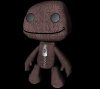
    3D Sackboy

    This is my first Design on Cinema 4D

    3D Sackboy-sackboy.jpg
    dv8_fx and ibclare like this.
    NO PAIN NO GAIN!
    <a href=http://www.photoshopgurus.com/forum/attachments/general-photoshop-board/13521d1328216280-check-out-text-shark-ex2.jpg target=_blank>http://www.photoshopgurus.com/forum/...-shark-ex2.jpg</a>

  2. #2
    Forum Mod
    Join Date
    Mar 2002
    Location
    Here... ?
    Posts
    4,981
    Thanks
    10
    Thanked 191 Times in 189 Posts

    Re: 3D Sackboy

    That's a great frist . Is he poseable?

  3. #3
    Member
    Join Date
    Nov 2011
    Posts
    73
    Thanks
    0
    Thanked 1 Time in 1 Post

    Re: 3D Sackboy

    yup he is
    NO PAIN NO GAIN!
    <a href=http://www.photoshopgurus.com/forum/attachments/general-photoshop-board/13521d1328216280-check-out-text-shark-ex2.jpg target=_blank>http://www.photoshopgurus.com/forum/...-shark-ex2.jpg</a>

  4. #4
    Forum Mod
    Join Date
    Mar 2002
    Location
    Here... ?
    Posts
    4,981
    Thanks
    10
    Thanked 191 Times in 189 Posts

    Re: 3D Sackboy

    Hmmmm.... just thinking loud.

    Why not try using like a tread stitching for his mouth? Not X type but straight stitch like on jeans.... I was about to suggest buttons for eyes but suddenly remembered a model like that for Poser and DAZ Studio that uses buttons. Your's has a different look.

    How many polygons does sack boy have?

  5. #5
    Forum Mod
    Join Date
    Mar 2002
    Location
    Here... ?
    Posts
    4,981
    Thanks
    10
    Thanked 191 Times in 189 Posts

    Re: 3D Sackboy

    I dunno about c4d... but in 3d modelling, to see if the model stands up to lighting effects one should render it with a white background. Have you tried it?

  6. #6
    Member
    Join Date
    Nov 2011
    Posts
    73
    Thanks
    0
    Thanked 1 Time in 1 Post

    Re: 3D Sackboy

    yea.. the mouth doesnt look pretty good i will try to fix it, button eyes is a very good idea ill try it to thanks bro ;)
    NO PAIN NO GAIN!
    <a href=http://www.photoshopgurus.com/forum/attachments/general-photoshop-board/13521d1328216280-check-out-text-shark-ex2.jpg target=_blank>http://www.photoshopgurus.com/forum/...-shark-ex2.jpg</a>

  7. #7
    Forum Mod
    Join Date
    Jun 2011
    Location
    Imperial Beach, CA, US
    Posts
    3,548
    Thanks
    97
    Thanked 216 Times in 215 Posts

    Re: 3D Sackboy

    Very funny Shark. Love him. I do think the eyes need something but I like the glow for a start. Button eyes could work but they're a bit trite. The effect you're currently after has a kind of edge that takes off some of the cute -- which IMO is a good thing.
    SHARK X likes this.


Posting Permissions

  • You may not post new threads
  • You may not post replies
  • You may not post attachments
  • You may not edit your posts
Powered by vBulletin® Version 4.1.9
Copyright © 2012 vBulletin Solutions, Inc. All rights reserved.
Content Relevant URLs by vBSEO 3.6.0
Copyright 2011 Photoshop Gurus Forum. All rights reserved.
All times are GMT -5. The time now is 04:14 AM.
vBulletin Skins