
+ Reply to Thread
Page 1 of 2 12 LastLast
Results 1 to 10 of 13
  1. #1
    Member
    Join Date
    Dec 2010
    Posts
    35
    Thanks
    0
    Thanked 0 Times in 0 Posts

    Joining different paths in Illustrator, help?

    Hello all!

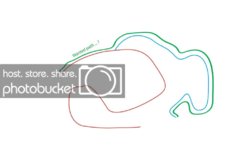
    I've been working with Illustrator recently, and I've got this problem. When I draw two paths, for example, see the little drawing underneath, I drew the path in red and the one in blue. Now, say I would like to make a new path, made from these two, like the green one. But don't get me wrong, the green has been moved a bit up, as to not clutter the rest of the image.

    So, I would like my path to *start* with the red path, then at a certain point leave from the red path and continue to the blue path.

    Now, I was wondering (and hoping), is there any predefined control for something like this? Or perhaps a walk-around? What would you guys suggest?

    Thanks a lot for your replies!
    Take care,
    Gabriel

    Here is the example drawing:
    Last edited by gabrielh; 11-24-2011 at 01:51 AM.

  2. #2
    Guru
    Join Date
    Jan 2011
    Location
    Elizabeth Port NJ
    Posts
    1,503
    Thanks
    15
    Thanked 149 Times in 143 Posts

    Re: Joining different paths in Illustrator, help?

    Hi gabrielh

    Your linked image is not working, perhaps you could check this out, Adjusting path segments

    Hope this helps.
    Cuando soy Bueno, soy muy BUENO
    Pero cuando soy malo, soy mucho MEJOR

  3. #3
    Member
    Join Date
    Dec 2010
    Posts
    35
    Thanks
    0
    Thanked 0 Times in 0 Posts

    Re: Joining different paths in Illustrator, help?

    Thank you for your help. I tried all the best I could to get the link to work, but without succes. I used photobucket for this, and although my image has a white background, photobucket changed all the colours to black... Any advice on this to make it work?

    This was an interesting read, but not really what I was searching for. I am actually searching for a sort of "pathfinder operations for paths", instead of for "insides" of paths. So, one could select different subpaths of existing path and make a new one that follows these different parts of different paths.

    Any idea/advice?

    Thanks!

  4. #4
    Member
    Join Date
    Dec 2010
    Posts
    35
    Thanks
    0
    Thanked 0 Times in 0 Posts

    Re: Joining different paths in Illustrator, help?

    Link now working! Thanks for any advice!

  5. #5
    Member
    Join Date
    Dec 2010
    Posts
    35
    Thanks
    0
    Thanked 0 Times in 0 Posts

    Re: Joining different paths in Illustrator, help?

    Thanks Paul for the input! Well, I would prefer not to use the pen tool as I would like to have the exact same subpath different times. And for the magic wand, can you elaborate on this, I don't see what you meen... But I'm working in Illustrator for this project, so I don't think there is a magic wand in there?
    Thanks a lot for the help!!

  6. #6
    Silly Trucker
    Join Date
    May 2011
    Location
    Trucking the big roads, dust and all.
    Posts
    4,530
    Thanks
    43
    Thanked 228 Times in 223 Posts

    Re: Joining different paths in Illustrator, help?

    Sorry my friend i have deleted my post i miss read your request, magic wand is available it's in your drop down menu under WINDOW.
    I made this on a new layer, you could make any amount of copies and change colour.


  7. #7
    Member
    Join Date
    Dec 2010
    Posts
    35
    Thanks
    0
    Thanked 0 Times in 0 Posts

    Re: Joining different paths in Illustrator, help?

    Wauw, that's great, Paul, thanks! Can you give more insight as how you actually created the orange path? I try with Magic Wand, but don't know how this feature works... Thanks!!

  8. #8
    Silly Trucker
    Join Date
    May 2011
    Location
    Trucking the big roads, dust and all.
    Posts
    4,530
    Thanks
    43
    Thanked 228 Times in 223 Posts

    Re: Joining different paths in Illustrator, help?

    I just clicked around the lines to keep while holding down the shift key being careful not to pick up any outside area (non line) ZOOM IN ON IMAGE TO ACHIEVE IT - when your happy with it right click and refine it if you wish and then save it.


  9. #9
    Member
    Join Date
    Dec 2010
    Posts
    35
    Thanks
    0
    Thanked 0 Times in 0 Posts

    Re: Joining different paths in Illustrator, help?

    Ok, I see it now, thanks! But.... When I click the whole path gets selected. How can I select only portions of this, till the interestion point? And does this technique also work if the two paths were from the same colour?
    Thanks!

  10. #10
    Silly Trucker
    Join Date
    May 2011
    Location
    Trucking the big roads, dust and all.
    Posts
    4,530
    Thanks
    43
    Thanked 228 Times in 223 Posts

    Re: Joining different paths in Illustrator, help?

    Before you make your selection you have to invert it.


Tags for this Thread

Posting Permissions

  • You may not post new threads
  • You may not post replies
  • You may not post attachments
  • You may not edit your posts
Powered by vBulletin® Version 4.1.9
Copyright © 2012 vBulletin Solutions, Inc. All rights reserved.
Content Relevant URLs by vBSEO 3.6.0
Copyright 2011 Photoshop Gurus Forum. All rights reserved.
All times are GMT -5. The time now is 04:50 PM.
vBulletin Skins