+ Reply to Thread
Page 1 of 2 12 LastLast
Results 1 to 10 of 13

Thread: Scary Sheep

  1. #1
    Guru
    Join Date
    May 2011
    Location
    Sweden
    Posts
    1,359
    Thanks
    34
    Thanked 55 Times in 54 Posts

    Scary Sheep

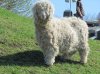
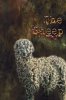
    Scary Sheep-f%E5r-kopia-krympt-webb.jpgScary Sheep-sheep-shrink-1920-1280-f%F6r-webb.jpgHi! I´m trying to learn Photoshop and this is probably the first thing I´ve been able to make that I´m the least bit happy with. I went out and took some pictures of the sheep that live around here and decided to use one of them to practice my Photoshopping on.

    These are the before picture and what I did to it .

    I got a bit carried away with the dodge and burn tools and have completely ruined the edges around the sheep I think, is there anyonr who knows if it is fixable in some way? as far as i understand, the dodge and burn tools are destructive and can´t be changed.

    Now I´m going to try and see if I can attach the pictures..

    Uh....I can´t seem to be able to load the pictures from my computer.. help?

    Yes! it worked!
    Last edited by Vafann; 05-25-2011 at 11:57 AM. Reason: Can´t load pictures

  2. #2
    Forum Mod
    Join Date
    Mar 2002
    Location
    Here... ?
    Posts
    4,989
    Thanks
    10
    Thanked 191 Times in 189 Posts

    Re: Scary Sheep

    It doesn't show in latest posts..... so I'm bumping this up for you......

    ooooohhhhh.... hairs.... the hardest parts to isolate in an image..... But you did well on your first real outing.

    I notice that there's a pale white glow around the sheep. Did you mean it to be that way? If not I think it's the result of your selecting the sheep from the image. Use the eraser tool with a soft airbrush/ lowered flow to delete those unwanted edges

    Unfortunately there no way to totally undo dodge and burn. which is why its a good idea to keep an untouched original layer image in case you need to go back.

    OR.... use the history brush to paint over and return the image to an earlier untouched or better state...... but I think it's too late now to use it now , right... lol....

  3. #3
    Junior Member
    Join Date
    May 2011
    Location
    I'm over here
    Posts
    16
    Thanks
    0
    Thanked 0 Times in 0 Posts

    Re: Scary Sheep

    I really like your text effects against your chosen background Vafann. Very nice for your first foray imo. If you have the orig. pix you could clone back at a very low opacity the edge you speak of. In your future efforts, The tools to become proficient with are adjustment layers and layer masks. Just about anything you want to do can be done in a non-destructive manner and can be revisited, readjusted, deleted etc.
    For me, learning the ins and outs of these two tools has been an immense leap in my proficiency and decreased my frustration level. As DV8FX stated, a good practice is to copy the original doc layer. I do that automatically, then turn of it's visibility to see the effects I'm using on the top layers. Combine that with adj. layers and masks and you have access to everything you modified. I have used all my default 20 undos just tweaking around with one tool on an edge. With the above guidelines you have virtually infinite adjustment undos. Nice job Vafann.

  4. #4
    Silly Trucker
    Join Date
    May 2011
    Location
    Trucking the big roads, dust and all.
    Posts
    4,530
    Thanks
    43
    Thanked 228 Times in 223 Posts

    Re: Scary Sheep

    To give the edges a woolie look i used a brush tool with a cluster of dots in it (don't know it's name)
    Last edited by Paul; 05-25-2011 at 11:58 PM.


  5. #5
    Guru
    Join Date
    May 2011
    Location
    Sweden
    Posts
    1,359
    Thanks
    34
    Thanked 55 Times in 54 Posts

    Re: Scary Sheep

    Wow! Thank you ALL for your comments and suggestions, I´m going to try to use all of them, and then see if I can at least make it a little better. I must keep in mind never to use the dodge and burn without an adustment layer. I am going to try all of your suggstions. I did try to use a regular new layer, but I found out that you can use one with those tools. I´m really happy that I became a member here, you guys are really great!

  6. #6
    Junior Member
    Join Date
    May 2011
    Location
    I'm over here
    Posts
    16
    Thanks
    0
    Thanked 0 Times in 0 Posts

    Re: Scary Sheep

    Bumping this 'cause I think I found a good solution to define and select those myriad strands of hair in any document. It is the EXTRACT Filter, dc'd since CS4 but you can add it to your filters if you have prior PS releases. It brings up a whole new interface of your document and basically allows you to choose a very general area with a bright green brush, you close the area, ie a circular closed brush track, then fill that area with a bright purple wash via the bucket , hit okay, and Voila! 90% of those wayward strands are yours. I heard Adobe has made this filter available on their site but I haven't checked that out. Hope this helps. Actually you can clean it up with the eraser. These are screen caps from a video tut not my own...see next post.
    -G
    Attached Thumbnails Attached Thumbnails Scary Sheep-vlcsnap-2011-06-12-17h22m20s181.png  

    Scary Sheep-vlcsnap-2011-06-12-17h26m22s74.png  

    Scary Sheep-vlcsnap-2011-06-12-17h24m51s138.png  

    Last edited by Guardian; 06-12-2011 at 08:40 PM.

  7. #7
    Junior Member
    Join Date
    May 2011
    Location
    I'm over here
    Posts
    16
    Thanks
    0
    Thanked 0 Times in 0 Posts

    Re: Scary Sheep

    Here is your sheep extracted in the very basic way, I would suggest you use a levels adjustment to increase the contrast of the edge before extracting, I didn't in this EX.
    You will get rid of the unwanted background artifacts with greater contrast in the mix. Upward & onward Or clean it up with the eraser. Here also is a video tut:
    YouTube - ‪Photoshop Tutorial :: Using the Extract Filter‬‏
    Attached Thumbnails Attached Thumbnails Scary Sheep-f%E5r-kopia-krympt-webb1.jpg  

    Last edited by Guardian; 06-12-2011 at 09:03 PM.

  8. #8
    Guru
    Join Date
    May 2011
    Location
    Sweden
    Posts
    1,359
    Thanks
    34
    Thanked 55 Times in 54 Posts

    Re: Scary Sheep

    Oh thank you! I have CS3 but I also have Elements 8 and that has the "Magic extract tool" or whatever it´s called in English. I forgot about that! I´ll try that next time!

  9. #9
    Junior Member
    Join Date
    May 2011
    Location
    I'm over here
    Posts
    16
    Thanks
    0
    Thanked 0 Times in 0 Posts

    Re: Scary Sheep

    Cool...glad you checked back

  10. #10
    Junior Member
    Join Date
    Jun 2011
    Location
    Lansing, MI
    Posts
    9
    Thanks
    0
    Thanked 0 Times in 0 Posts

    Re: Scary Sheep

    Just out of curiosity: where did you snap the pic at?


Tags for this Thread

Posting Permissions

  • You may not post new threads
  • You may not post replies
  • You may not post attachments
  • You may not edit your posts
Powered by vBulletin® Version 4.1.9
Copyright © 2012 vBulletin Solutions, Inc. All rights reserved.
Content Relevant URLs by vBSEO 3.6.0
Copyright 2011 Photoshop Gurus Forum. All rights reserved.
All times are GMT -5. The time now is 05:54 PM.
vBulletin Skins