
Photoshop Gurus Forum
Welcome to Photoshop Gurus forum. Register a free account today to become a member! It's completely free. Once signed in, you'll enjoy an ad-free experience and be able to participate on this site by adding your own topics and posts, as well as connect with other members through your own private inbox!
You are using an out of date browser. It may not display this or other websites correctly.
You should upgrade or use an alternative browser.
You should upgrade or use an alternative browser.
My First Attempt At Colouring
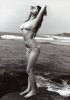




usually because the person coloring it is white themselves. so it's natural instinct to to a white person. or thinks from the anatomy of the woman, they would be white.
personally i think the woman looks more Asian than anything.
but let's not get into that debate.
its a great go at coloring there OP i'd probably never get that level of detail.
personally i think the woman looks more Asian than anything.
but let's not get into that debate.
its a great go at coloring there OP i'd probably never get that level of detail.
Last edited:

Hoogle
Guru
- Messages
- 7,940
- Likes
- 2,488
well trying to make any white person black would not look good nor would making a black person white but it could be done here is an example with just 1 quick fly over using a dark brown and set the layer blending mode to darker rather than colour yes it needs fine tweaking and better colouring in skills and yes I did use Belials picture for a demo purpose only if you put time into it and built layers up gradually you could achieve it.


gohan2091
Well-Known Member
- Messages
- 61
- Likes
- 3
I think it looks good! The red in the bikini is as Fairy said a bit too harsh, and the bikini bottom has bled a bit around the hip and up the back. But it looks good otherwise, maybe the water and rocks are a little bit too dark though.
The problem with the bikini is, I painted over it on a new layer and set the layer to mulitple. I then added a hue/saturation adjustment layer over the top (set to normal) but because the bikini layer was set to mulitple, it's very difficult to reduce the saturation of the bikini using the saturation slider... it just doesn't reduce the saturation how I want, and ends up draining all colour very quickly. I changed the colour of the bikini though and made it a little less harsh. I also edited the sea, making it less dark but the rocks I was unable to lighten up
 . In the original picture, her bikini bottoms actually goes up her back a little, obviously it doesn't but it sure looks that way, it must be the shape of her ass.
Do her as a black woman, and yeah the bottoms are to harsh and slight blurring/pixel distortion to some edges, something like this, it's really hard to do as a black person, as hard as a white skin in my opinion. But everyone seems to always go for the white skin, why is that i wonder?
This is an Asian women, so this is why she is not black. I like black women but prefer lighter skinned. Yes, the image I used is a bit pixelated and not very high resolution. I shall try findng a higher resolution picture when I attempt to colour in next time.
usually because the person coloring it is white themselves. so it's natural instinct to to a white person. or thinks from the anatomy of the woman, they would be white.
personally i think the woman looks more Asian than anything.
but let's not get into that debate.
its a great go at coloring there OP i'd probably never get that level of detail.
Yes, I am white myself and the women is Asian. I've now edited her skintone so she looks more Asian (at least that was my goal, whether I succeeded or not is unknown)
well trying to make any white person black would not look good nor would making a black person white but it could be done here is an example with just 1 quick fly over using a dark brown and set the layer blending mode to darker rather than colour yes it needs fine tweaking and better colouring in skills and yes I did use Belials picture for a demo purpose only if you put time into it and built layers up gradually you could achieve it.
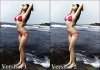
Here is my revision, with the original beside it (Please click it so it opens up larger). Has the image improved or gotten worse? Can anyone suggest further improvements? Since she is wearing tie-side bikini bottoms and the image is already pixelated from the beginning, I cannot colour her bottoms as well as I would like, so some of her hips is affected, but I have tried my best to minimise this.
Last edited:
Hoogle
Guru
- Messages
- 7,940
- Likes
- 2,488
Depends how much time your willing to put into it the best 2 options would be to (A) clone out the pixels using amid renge hardness brush on a mid range opacity and build it up or (B) instead of cloning use a colour paint brush as close to skin colour as possible on a 10 -20% opacity and build it up using a soft edge brush so you dont get obvious lines you may also in this case use the same options on the sea to balance it out

Vafann
Guru
- Messages
- 1,334
- Likes
- 367
Now I´m kind of afraid to say anything since you have worked so hard on changing it. I´ll start with what I like better, I think you have made the skin look more smooth and realistic as far as the light is concerned, she doesn´t have those harsh differences between dark and light, like in her face for example like she did before. I like that rocks and water are a little lighter. Even though you have had problems with the red bleeding like up her back and around her hips, you have fixed it some, and that looks better too.
Now for what "I don´t like", and it´s not that I don´t like it, it´s that I actually preferred the red color of the original bikini, it was just a bit too saturated, I´m not so fond of the pink color it has become, but that of course is just personal taste, it´s better as far as saturation is concerned. I also liked her skin looking a bit more tanned, since I suppose she is standing in the sun, and is supposed to be tanning, but I guess if you make her skin darker the shadows will grow darker as well and that was the problem to begin with I think.
When I said that I thought that the water was too dark, I meant too dark a blue color, not just the lighting. All of this is of course just personal preferences, and I think over all you have made the picture better.
Sometimes I wonder if we all see the same things here, as far as colors and brightness and things are concerned since we all have different moniters that might be calibrated differently, so that what we are seeing might not be the way things actually look, that could cause problems in cases like this I think. it might not be your coloring that is a problem, it could be my monitor opposed yours for example.
Anyway, you have done a very good job all and all, and I doubt that I could get it even half as good as that, I´m just giving my opinion of what I see.
Now for what "I don´t like", and it´s not that I don´t like it, it´s that I actually preferred the red color of the original bikini, it was just a bit too saturated, I´m not so fond of the pink color it has become, but that of course is just personal taste, it´s better as far as saturation is concerned. I also liked her skin looking a bit more tanned, since I suppose she is standing in the sun, and is supposed to be tanning, but I guess if you make her skin darker the shadows will grow darker as well and that was the problem to begin with I think.
When I said that I thought that the water was too dark, I meant too dark a blue color, not just the lighting. All of this is of course just personal preferences, and I think over all you have made the picture better.
Sometimes I wonder if we all see the same things here, as far as colors and brightness and things are concerned since we all have different moniters that might be calibrated differently, so that what we are seeing might not be the way things actually look, that could cause problems in cases like this I think. it might not be your coloring that is a problem, it could be my monitor opposed yours for example.
Anyway, you have done a very good job all and all, and I doubt that I could get it even half as good as that, I´m just giving my opinion of what I see.
gohan2091
Well-Known Member
- Messages
- 61
- Likes
- 3
Thanks all for your replies. I understand I can use a brush and paint many layers of skin over her to make very realistic skin tones but I feel I don't need to do this to achieve a realistic looking image. I don't have the skills or experience to do this anyway I think lol.
Vafann, please if there are things you dislike, just let me know, I won't bite your head off. I appreciate constructive criticism to better improve myself. It is very true about the monitor calibration, as what I am seeing may not be what you see.
Here is another version, this is probably going to be my last attempt. I feel I achieved a realistic looking image on my first attempt but I have certainly improved things with your suggestions!

Vafann, please if there are things you dislike, just let me know, I won't bite your head off. I appreciate constructive criticism to better improve myself. It is very true about the monitor calibration, as what I am seeing may not be what you see.
Here is another version, this is probably going to be my last attempt. I feel I achieved a realistic looking image on my first attempt but I have certainly improved things with your suggestions!
Artistapinay
Member
- Messages
- 7
- Likes
- 2
nice work sir how do you color a black and white photo?
gohan2091
Well-Known Member
- Messages
- 61
- Likes
- 3
nice work sir how do you color a black and white photo?
I suggest looking at some tutorials. For me, I drew around the person with a pen tool, made a new selection and painted a skintone on using a colour from a 5 by 5 sample of the colour picker. I then made various adjustment layers to alter the skintone further like levels, brightness & contrast. By using different layer styles (like overlay, screen and pin light) some interesting things happen. For the sea, I sampled the colour of real sea from an image found on Google using a 5 by 5 sample and painted over the sea on a new layer, adjusted the layer style. I made a hue/saturation adjustment layer, adjusted the blue's saturation and lightness, made a black layer mask of this and painted in the colour with a white brush. Same for the sky. As for the bikini, similar thing, just made a selection with the pen tool, painted a colour on and found a layer style that made the colour look realistic rather than it being painted on.
Last edited:
Poet Anderson
Active Member
- Messages
- 33
- Likes
- 5
Oh gosh, it looks so awesome, I love version 1
gohan2091
Well-Known Member
- Messages
- 61
- Likes
- 3
Oh gosh, it looks so awesome, I love version 1
What do you like about version 1 that version 3 is lacking?
Poet Anderson
Active Member
- Messages
- 33
- Likes
- 5
I like brighter colors in version 1What do you like about version 1 that version 3 is lacking?
gohan2091
Well-Known Member
- Messages
- 61
- Likes
- 3
I like brighter colors in version 1
I am now confused because people said the colours before were too bright, in the sea and bikini. I guess different peoples opinions and screen calibration lol. Thanks for your comment
Last edited: