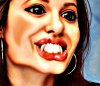
8Likes
-
Guru
-
-
Silly Trucker
-
-
Forum Mod
Re: vampires
@ Belial Love your caricature style work not being picky as I know we all have our own styles but may I suggest you play around with the unsharp mask filter and maybe add some dodge and burn to give them some depth.
an example of your image with unsharp mask
-
-
Silly Trucker
Re: vampires
Thanks H i do use a lot of dodge and burn in my compositions, i tend to smudge out.
Thanks for feedback though.
-
-
Guru
Re: vampires
Horrible!
Great job mate!
-
-
Senior Member
Re: vampires

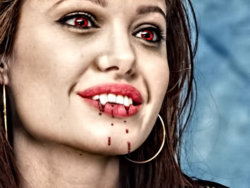
Edit: few changes
I take your bordem and raise you
, f***** the teeth up tho couldnt get em good from that angle :S
Last edited by stufflol; 08-18-2011 at 06:55 PM.
-
-
Guru
Re: vampires
Stufflol,
That looks AWESOME! How did you age the skin? Love that effect.
If you darken the teeth slightly then add hilights like in the original, I think your fans will look great.
-
-
Senior Member
Re: vampires
Combination of feathering a dark curves to the shaded areas, and then enhanced the details with topaz :P thx
-
-
Guru
-
-
Guru
Re: vampires

Originally Posted by
stufflol
Combination of feathering a dark curves to the shaded areas, and then enhanced the details with topaz :P thx
What is topaz?
-
Tags for this Thread
Posting Permissions
- You may not post new threads
- You may not post replies
- You may not post attachments
- You may not edit your posts
Forum Rules
Powered by
vBulletin® Version 4.1.9
Copyright © 2012 vBulletin Solutions, Inc. All rights reserved.
Content Relevant URLs by
vBSEO 3.6.0
Copyright 2011 Photoshop Gurus Forum. All rights reserved.