6Likes
-
3
Post By Paul
-
2
Post By SeniorS
-
1
Post By SeniorS
-
Silly Trucker
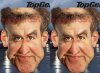
Better - i think?
This is a version of one of my heroes photoshops of jeremy clarkson the tv car guy.
My inspiration came from this RWPike's Photo Manipulation and Caricatures: Jeremy Clarkson ~ Caricature Study
I used the same source original image as him, and i made this NOT A EXACT COPY - MY VERSION OF HIS VERSION
-
-
Silly Trucker
Re: Better - i think?
If anyone does know the secret to making the image that as been manipulated look absolutely sharp and crisp in appearance please pm with the info, it's killing me at the minute.
Thanks.
-
-
Guru
Re: Better - i think?
I like the show and your version.
That RWPike is good. I think that level of weird manipulation you want to achieve? And you are doing really well.
P.S. One wanted to ask long time ago. I don't know how you doing it. But is that posible to add grain/texture or something on retouched parts? You know i mean.
Rather than love, than money, than fame, give me truth. © Henry David Thoreau
-
-
Guru
Re: Better - i think?
If anyone does know the secret to making the image that as been manipulated look absolutely sharp and crisp in appearance please pm with the info, it's killing me at the minute.
Thanks.
LoL...man
We are on one wave or something?
Rather than love, than money, than fame, give me truth. © Henry David Thoreau
-
-
Silly Trucker
Re: Better - i think?
Yeah one trick i have sussed is doing a new layer and brushing over the chin area with a stipple typed bristle effect then embossing it slightly then make a few alterations to that and lay it over the colour layer and blend it slightly.
What i am after is that crispness and natural look even after the pixels have been pulled about.
-
-
Guru
Re: Better - i think?
I don't know how to add image to PM. I mean easy way not url but straight to server...lol.
So i'll post here.

There several ways i know. Easy ones.
Of course sharpness filter are good if used with right settings.
In that image isn't so obvious imporvment visible.
In this one i used for bigger areas i used Smart Sharpen. For small areas Shrapen tool 10% Strength.
For big lines sharpen (i don't know how to say it right) use High Pass sharpening method. Sometimes it's good to make several little steps than one big sharpening.
But if you have all that blury thing in separate layer it's much easier i think.
On total blured you can use Noise filter in combination with blur and Sharpen.
It can help sometimes to simulate texture.
Example (i took one segment and blured then restored by Noise (10), little Gaussian Blur (0,4) and litte Smart Sharpening (16/0,7 Lens Blur) not best probably but it shows about what can be done:


Something like that.
Or use real skin texture.
Rather than love, than money, than fame, give me truth. © Henry David Thoreau
-
The Following User Says Thank You to SeniorS For This Useful Post:
-
Silly Trucker
Re: Better - i think?
Yeah i am there now mate thanks , its just a very fine line between looking smack on and looking like a pixel fight, thanks anyway mate appreciated.
Nice mini tut also.
-
-
Guru
Re: Better - i think?
Anytime mate!
Yeah, that's very individual to eash image and need combinate different method. And it's very smooth line, too much and it's again looks unnatural.
I don't know much tricks but if need something explain from easy ones pm.
P.S. I update image a little with little more sharpen (5min after posting). Probably you allready watched new version.
Rather than love, than money, than fame, give me truth. © Henry David Thoreau
-
-
Power User
Re: Better - i think?
I must say, I LOVE TOP GEAR!!!
'and with that bombshell!'
Nobody reads this, YOU ARE NOBODY!! :D
-
-
Silly Trucker
Re: Better - i think?
Yeah i noticed Senior, thanks again.
-
Tags for this Thread
Posting Permissions
- You may not post new threads
- You may not post replies
- You may not post attachments
- You may not edit your posts
Forum Rules
Powered by
vBulletin® Version 4.1.9
Copyright © 2012 vBulletin Solutions, Inc. All rights reserved.
Content Relevant URLs by
vBSEO 3.6.0
Copyright 2011 Photoshop Gurus Forum. All rights reserved.