11Likes
-
A few B&A's

This one I'm actually really proud of, even though it's relatively simple as far as work done/time. The woman is a stock photo from depositphotos, the fish are random images from google.

Sarah Umbridge.. Not meant to offend any Palin fans, was done in humor, and I apologize in advance if I've offended anyone with it.
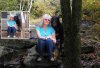
This is a picture of my mom and her dog. After the dog died, she wanted a nice picture of them together, and told me "any background, just not the one that's there". I liked the idea of an outdoor scene, but her feet - I just can't seem to get right. Also, the more I look at it, the more I think the shadows are way off. Buuuut unfortunately I flattened the image to copy it as a solid layer, and forgot to unmerge the layers before saving (D'OH!!).. so I'd have to start mostly from scratch to fix any of it 
When I am ready to start over on my mom's pic, any suggestions on the feet?
-
-
Guru
Re: A few B&A's
Great work Pebbiez! The feet thingie, well, maybe placing something in front of one of them would solve the problem.
-
-
Junior Member
Re: A few B&A's
Very Nice!! Your shading on the bottom picture is great! You'd really have to look to be able to tell that it's pasted from another image
-
-
Re: A few B&A's
thanks guys
I'll try to find something to fit over the feet when I start working on it again. I tried adding a log to cover her feet (after I had saved the flattened image by mistake), but by that point it made the front tree look paper thin :/
-
-
Administrator
Re: A few B&A's
Very nice work Pebbiez and welcome to PSG.
-
-
Guru
Re: A few B&A's
I WOULD SELECT THE FEET FEATHER A FEW PX THEN USE CURSES..... just enough to darken them, so as to not stand out as much
-
-
Guru
Re: A few B&A's
Why not throw both of them pics up (of your mom) and we all could have a go at it. Just for the fun of it.
-
-
-
-
Re: A few B&A's
erm, also it's been about 3 months since I did the original one, this time around I used different rocks for under her feet. Originally I had merged the 2 rocks on the left to create the steps. This time around, I cut part of the rock she's sitting on, and merged it with the larger rock on the left.
-
-
Silly Trucker
-
Tags for this Thread
Posting Permissions
- You may not post new threads
- You may not post replies
- You may not post attachments
- You may not edit your posts
Forum Rules
Powered by
vBulletin® Version 4.1.9
Copyright © 2012 vBulletin Solutions, Inc. All rights reserved.
Content Relevant URLs by
vBSEO 3.6.0
Copyright 2011 Photoshop Gurus Forum. All rights reserved.