+ Reply to Thread
Page 1 of 2 12 LastLast
Results 1 to 10 of 18
Like Tree9Likes

Thread: Ongoing attempt at Digital Painting

  1. #1
    Member
    Join Date
    Oct 2011
    Location
    Swansea, Wales
    Posts
    92
    Thanks
    4
    Thanked 9 Times in 9 Posts

    Ongoing attempt at Digital Painting

    Hi All

    I thought I would start a thread that follows my attempt to draw an image, put it into Photoshop and color it. My hope is that along the way I can get some hints, tips, pointers to useful tutorials and constructive criticism... Then at the end of it all a picture I am proud of (Perhaps even give some help/ideas to others who are interested in similar things)

    From the start I would like to say I am no artist so this is pretty out of my comfort zone, the idea came from one of the challenges on this forum (#20 I think). I'm following a tutorial of sorts from a book called "The Monster Book of Manga - Fairies and Magical Creatures)" so the character is not my own but along the way I hope to develop it into something a little more personal to me.

    I don't know how long this will take as I don't get much spare time but each time I make some significant changes to the picture I will post the results in this thread.

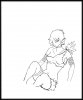
    Image #1 is the untouched scan of the drawing I have done, originally I wanted to do the whole thing in Photoshop including the sketch but I just didn't have the skills :(

    It's fairly obvious when you see this that I haven't managed to get started on the hands or feet yet, I'm hoping to sort those out a little later (with a little help from youtube). To help with the digital inking process I have already "pre-inked" the image and got rid of most of my pencil lines.

    Here goes - feel free to comment as you wish
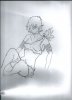
    Ongoing attempt at Digital Painting-firstscan1211.jpg

    webwize
    sprucemagoo1 and Hoogle like this.

  2. #2
    Member
    Join Date
    Oct 2011
    Location
    Swansea, Wales
    Posts
    92
    Thanks
    4
    Thanked 9 Times in 9 Posts

    Re: Ongoing attempt at Digital Painting

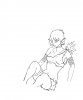
    OK it's nearly 2am and time for bed but before I go here's image #2. The original scan has been tidied using a levels adjustment layer and a combination of overlay and multiply layers. I've also set up the canvass better so now I have something to work on...

    Ongoing attempt at Digital Painting-tidylines.jpg

  3. #3
    Forum Mod
    Join Date
    Jun 2011
    Location
    Imperial Beach, CA, US
    Posts
    3,562
    Thanks
    97
    Thanked 218 Times in 217 Posts

    Re: Ongoing attempt at Digital Painting

    I'm impressed. For someone who says he's (she's?) not an artist, you're doing a pretty good imitation!

    You're losing a few details in some of the delicate lines, but you might be able to get that back with duplicating the layer, maybe changing blend mode.

    I like your avatar as it is now.

  4. #4
    Guru
    Join Date
    Jun 2009
    Location
    A, A
    Posts
    738
    Thanks
    13
    Thanked 50 Times in 50 Posts

    Re: Ongoing attempt at Digital Painting

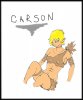
    Hope this helps Webwize!
    Ongoing attempt at Digital Painting-drawing.jpg
    Chad Spruce Carter


  5. #5
    Forum Mod
    Join Date
    Jun 2011
    Location
    Imperial Beach, CA, US
    Posts
    3,562
    Thanks
    97
    Thanked 218 Times in 217 Posts

    Re: Ongoing attempt at Digital Painting

    lines at the bottom are too thick Chad. What method are you using?

    Extract Lineart in 8 Simple Steps | this is probably very similar to what you are doing already if not the same. Except he use channels to make selection then fill it. Not sure that would be any different than deleting or masking though.

    You can make the lines darker by using linear burn instead of multiply

    There was/is a similar thread in which the guy was asking about stroke layer effect. Your lines are probably too delcate for that though...

    Anyway, you're doing a great job and I'd love to see more.
    Last edited by ibclare; 12-16-2011 at 04:03 PM.

  6. #6
    Guru
    Join Date
    Jun 2009
    Location
    A, A
    Posts
    738
    Thanks
    13
    Thanked 50 Times in 50 Posts

    Re: Ongoing attempt at Digital Painting

    Yeah, I only noticed her bum line were fat when I posted the image. I then noticed that the lines on his/hers were fine in that region, and would not be difficult at all to merge the two.

    I don't ever use one certain method, I use what ever I feel will get the results I want.
    Chad Spruce Carter


  7. #7
    Power User
    Join Date
    Mar 2011
    Location
    Kentucky
    Posts
    230
    Thanks
    5
    Thanked 7 Times in 7 Posts

    Re: Ongoing attempt at Digital Painting

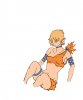
    Do you want something like this. I'm also trying to learn coloring.
    Ongoing attempt at Digital Painting-tidylines.jpg

  8. #8
    Silly Trucker
    Join Date
    May 2011
    Location
    Trucking the big roads, dust and all.
    Posts
    4,530
    Thanks
    43
    Thanked 228 Times in 223 Posts

    Re: Ongoing attempt at Digital Painting

    Would this be of some use to you?
    MASKING YOUR DRAWING TUT


  9. #9
    Member
    Join Date
    Oct 2011
    Location
    Swansea, Wales
    Posts
    92
    Thanks
    4
    Thanked 9 Times in 9 Posts

    Re: Ongoing attempt at Digital Painting

    Thanks for all the reply's so far, I haven't had a chance to turn on the PC until now this weekend (Christmas is coming). I'm going to have a look at the tutorials above now and then go back to the picture, I should hopefully have something to post a little later Special mention for Carson - the coloring is great.

  10. The Following User Says Thank You to webwize For This Useful Post:

    Carson (12-24-2011)

  11. #10
    Member
    Join Date
    Oct 2011
    Location
    Swansea, Wales
    Posts
    92
    Thanks
    4
    Thanked 9 Times in 9 Posts

    Re: Ongoing attempt at Digital Painting

    Right - I think I have the lines down now - what do you think? Followed some of the tutorial (thanks Clare) and then did a little close up work with the paintbrush to tidy it up. I realise that I could spend hours on this but I'm happy with these for now.

    Ongoing attempt at Digital Painting-tidylinesv3.jpg


Tags for this Thread

Posting Permissions

  • You may not post new threads
  • You may not post replies
  • You may not post attachments
  • You may not edit your posts
Powered by vBulletin® Version 4.1.9
Copyright © 2012 vBulletin Solutions, Inc. All rights reserved.
Content Relevant URLs by vBSEO 3.6.0
Copyright 2011 Photoshop Gurus Forum. All rights reserved.
All times are GMT -5. The time now is 09:59 PM.
vBulletin Skins