SeniorS
Guru
- Messages
- 1,517
- Likes
- 452
Often You need or want to add files to your posts.
You can do it directly in PhotoShopGurus (no need to upload files to diferent servers).
Read http://www.photoshopgurus.com/forum...6-types-attachments-you-can-upload-forum.html to make sure You may upload Your choosen file type.
Here how to do it step by step.
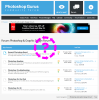
1. Press "Go Advanced"
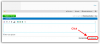
2. Type text you want and leave text cursor (inside post "zone") where you want to place your image.
And press "Manage Attachments"
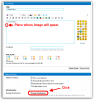
3. Press "Add Files"
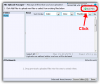
4. Press "Choose File" (laguage can differ)
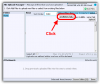
5. Choose with system dialog your file.
6. Press "Upload"
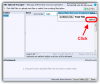
7. You should get something like that.
Press "Insert Inline (1)" (You can upload more that one file per time)
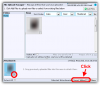
8. Press "Done"
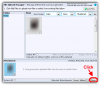
9. You should get someting like that
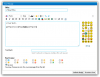
Now file is placed in your post's body. When You ready just press "Submit Reply".
You can do it directly in PhotoShopGurus (no need to upload files to diferent servers).
Read http://www.photoshopgurus.com/forum...6-types-attachments-you-can-upload-forum.html to make sure You may upload Your choosen file type.
Here how to do it step by step.
1. Press "Go Advanced"
2. Type text you want and leave text cursor (inside post "zone") where you want to place your image.
And press "Manage Attachments"
3. Press "Add Files"
4. Press "Choose File" (laguage can differ)
5. Choose with system dialog your file.
6. Press "Upload"
7. You should get something like that.
Press "Insert Inline (1)" (You can upload more that one file per time)
8. Press "Done"
9. You should get someting like that
Now file is placed in your post's body. When You ready just press "Submit Reply".
Last edited: