Hi there,
on a picture. i can turn a blue object into yellow, green or any other color. and vice versa.
To do that i know 5 different ways, or combination of those methods.
1- Hue/Saturation
2- Color Balance
3- Selective Color
4- Replece Color (Similar to Hue/Saturation)
5- select the area, create a new layer, paint the selected area on new layer, blend the new layer with "linear burn".
but when it comes to black, i can't change the black to another color with any of the ways above. So i was wondering if it is possible to turn a black object into white without killing the texture. Or cleaning the object from colors, making it colorless.
best way i know so far is playing with "exposure" settings. but this time the objcet on the image is becoming blure and loosing its texture.
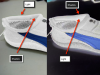
Here is the object i m trying to make white (or colorless). Do you know any way to do it?

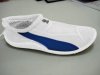
i need to make that shoe as white/colorless as this one below.

thanks
on a picture. i can turn a blue object into yellow, green or any other color. and vice versa.
To do that i know 5 different ways, or combination of those methods.
1- Hue/Saturation
2- Color Balance
3- Selective Color
4- Replece Color (Similar to Hue/Saturation)
5- select the area, create a new layer, paint the selected area on new layer, blend the new layer with "linear burn".
but when it comes to black, i can't change the black to another color with any of the ways above. So i was wondering if it is possible to turn a black object into white without killing the texture. Or cleaning the object from colors, making it colorless.
best way i know so far is playing with "exposure" settings. but this time the objcet on the image is becoming blure and loosing its texture.
Here is the object i m trying to make white (or colorless). Do you know any way to do it?
i need to make that shoe as white/colorless as this one below.
thanks
 you're job is not that simple..