+ Reply to Thread
Page 2 of 2 FirstFirst 12
Results 11 to 19 of 19
  1. #11
    Member
    Join Date
    Dec 2008
    Location
    United Kingdom
    Posts
    90
    Thanks
    37
    Thanked 0 Times in 0 Posts
    Quote Originally Posted by 2pixels View Post
    Not when you use my method. ;)
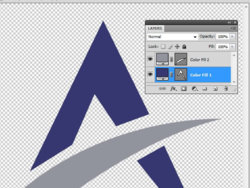
    I don't understand your method and how you separated my image into 2 different sections is beyond me.
    Intel Core i7 2600k - 2x4GB Corsair DDR3 XMS3 - MSI Radeon HD 6950 2GB Twin Frozr III Power Edition - Asrock Z68 Extreme4 - Corsair 120GB Force SSD - Corsair HX Series 620W - Windows 7 Home Premium 64bit

  2. #12
    Member
    Join Date
    Sep 2009
    Posts
    41
    Thanks
    0
    Thanked 0 Times in 0 Posts
    Quote Originally Posted by gohan2091 View Post
    Making the shape a smart layer and then increasing it's size to say 1000% causes the quality to reduce.
    Not when you use my method. ;)

    Quote Originally Posted by gohan2091 View Post
    I don't understand how you create a new fill or adj layer. Also, in your screenshot, you seem to have my shape split into two separate layers. One layer has the blue part, the other the grey part.
    You're asking too much if I also need to explain to you the use of basic Photoshop tools (costs way too much time), I'm only here to help with issues that go beyond that.

  3. #13
    Member
    Join Date
    Sep 2009
    Posts
    41
    Thanks
    0
    Thanked 0 Times in 0 Posts
    Now you're trying to build a house without knowing how to use a hammer and nails. ;)

  4. #14
    Member
    Join Date
    Dec 2008
    Location
    United Kingdom
    Posts
    90
    Thanks
    37
    Thanked 0 Times in 0 Posts
    Quote Originally Posted by 2pixels View Post
    Not when you use my method. ;)

    You're asking too much if I also need to explain to you the use of basic Photoshop tools (costs way too much time), I'm only here to help with issues that go beyond that.
    I don't understand why you spend your time helping me then quit at the end, what is the use of that? I've been using Photoshop for over half a decade but vector shapes are new to me. I know how to split a shape into separate layers but what I fear is losing that vector ability... the ability to enlarge a shape beyond it's original 100% size, yet keep the quality is the same.

    I know how to apply a fill layer to the entire shape, but what I don't know is how to select just the grey area and have that area use it's own fill layer.
    Intel Core i7 2600k - 2x4GB Corsair DDR3 XMS3 - MSI Radeon HD 6950 2GB Twin Frozr III Power Edition - Asrock Z68 Extreme4 - Corsair 120GB Force SSD - Corsair HX Series 620W - Windows 7 Home Premium 64bit

  5. #15
    Member
    Join Date
    Sep 2009
    Posts
    41
    Thanks
    0
    Thanked 0 Times in 0 Posts
    It's funny how you blame me for your lazyiness to learn the basic tools.

    So your pal who is helping you to build that house and who does know the basics, has to teach you first how to use that hammer and nail? Like I said... you're funny hehe

  6. #16
    Member
    Join Date
    Dec 2008
    Location
    United Kingdom
    Posts
    90
    Thanks
    37
    Thanked 0 Times in 0 Posts
    Quote Originally Posted by 2pixels View Post
    It's funny how you blame me for your lazyiness to learn the basic tools.

    So your pal who is helping you to build that house and who does know the basics, has to teach you first how to use that hammer and nail? Like I said... you're funny hehe
    I'm sorry you feel that way about me, but I am no noob and came here for help, not to be insulted. I know how to create a new fill layer for the two separate parts by remaking the whole image which I have now just done, what I don't know is how you did this with my existing image which already had both parts in one whole path (not two separate ones)

    As I said, I have now redrawn the shape, but for the middle section (grey), I made that part on an entirely new path. Because of this, I have now successfully achieved what I wanted. I think what I did wrong was to fill the area with the paint brush, rather than your method which is a fill layer. When I save the image now as an EPS, I get the rasterised box come up so all is good.

    Thanks for your help, even if I had to figure out what you meant.
    Last edited by gohan2091; 09-21-2009 at 06:12 PM.
    Intel Core i7 2600k - 2x4GB Corsair DDR3 XMS3 - MSI Radeon HD 6950 2GB Twin Frozr III Power Edition - Asrock Z68 Extreme4 - Corsair 120GB Force SSD - Corsair HX Series 620W - Windows 7 Home Premium 64bit

  7. #17
    Member
    Join Date
    Sep 2009
    Posts
    41
    Thanks
    0
    Thanked 0 Times in 0 Posts
    Quote Originally Posted by gohan2091 View Post
    I'm sorry you feel that way about me, but I am no noob and came here for help, not to be insulted.
    I never insulted you, all I said was that you were lazy and I still stand 100% behind that comment. If you don't know how to work with paths, then you simply refused to put any serious effort into it, in other words: "laziness". For you then to come here to DEMAND that I explain to you how to use the basics, when I already took my time to write two posts and prepare a screenshot for you is too foolish for words.

    Your problem is that you refuse to accept the fact that I don't want to explain basics. What kind of obligation do I have towards you? Do you pay me for the time I use to help you? Maybe if you would have posted tens of thousands of times on forums like these over the last 10 years like have, you would understand that I'm getting tired of explaining basic things like paths and mask over and over again....sigh (and I’m not the only one in the similar situation who thinks like this.)

    Btw, the refusal to spoon-feed you encouraged you to actually find the solution on your own, which you did and that's the second reason why I avoid answering basic questions.

    After all these years with Photoshop I've learn done thing; you enter the stage of "expertice" once you stop asking to be spoon-fed, because it encourages you to study, experiment, think and use your imagination, you’ll thank me in the long run.

    Anyway, that's all I had to add.

  8. #18
    Member
    Join Date
    Dec 2008
    Location
    United Kingdom
    Posts
    90
    Thanks
    37
    Thanked 0 Times in 0 Posts
    Quote Originally Posted by 2pixels View Post
    I never insulted you, all I said was that you were lazy and I still stand 100% behind that comment. If you don't know how to work with paths, then you simply refused to put any serious effort into it, in other words: "laziness". For you then to come here to DEMAND that I explain to you how to use the basics, when I already took my time to write two posts and prepare a screenshot for you is too foolish for words.

    Your problem is that you refuse to accept the fact that I don't want to explain basics. What kind of obligation do I have towards you? Do you pay me for the time I use to help you? Maybe if you would have posted tens of thousands of times on forums like these over the last 10 years like have, you would understand that I'm getting tired of explaining basic things like paths and mask over and over again....sigh (and I’m not the only one in the similar situation who thinks like this.)

    Btw, the refusal to spoon-feed you encouraged you to actually find the solution on your own, which you did and that's the second reason why I avoid answering basic questions.

    After all these years with Photoshop I've learn done thing; you enter the stage of "expertice" once you stop asking to be spoon-fed, because it encourages you to study, experiment, think and use your imagination, you’ll thank me in the long run.

    Anyway, that's all I had to add.
    I understand what you are saying but my solution was to scrap what I already made and start over. Is this the sort of action that you would support? I could not understand how I would separate my path into two separate paths without remaking the whole thing. It's a good job my design wasn't a complex one, as I would have not been prepared to recreate it all and would still be here asking how you did it. So how exactly did you do it? How did you turn my single path into two separate paths? Did you not use my path and created your own using the pen tool? If you did not do this, then I have not learnt how to do that yet.

    I understand the feeling of explaining time after time basic things to newcomers, but I am not a newbie. I was able to explain Photoshop in good detail, I knew all the correct terms and I used the pen tool which is something most newbies would not dare touch. Anyway, job done now but I have question to do with the pen tool which I will post in the next 5 minutes. Feel free to help me there if you feel like it. Thanks for your time and efforts, honestly... I really appreciate it.
    Last edited by gohan2091; 09-21-2009 at 06:54 PM.
    Intel Core i7 2600k - 2x4GB Corsair DDR3 XMS3 - MSI Radeon HD 6950 2GB Twin Frozr III Power Edition - Asrock Z68 Extreme4 - Corsair 120GB Force SSD - Corsair HX Series 620W - Windows 7 Home Premium 64bit

  9. #19
    KRF
    KRF is offline
    Power User
    Join Date
    Jun 2009
    Location
    United Kingdom
    Posts
    430
    Thanks
    0
    Thanked 3 Times in 3 Posts
    Quote Originally Posted by 2pixels View Post
    It's funny how you blame me for your lazyiness to learn the basic tools.

    So your pal who is helping you to build that house and who does know the basics, has to teach you first how to use that hammer and nail? Like I said... you're funny hehe
    I really think you need to take a step back, how did you learn to use Photoshop, BY ASKING, so please stop saying that your only here to help past the basics, if that's all your here for then why comment on any of the threads you have done, and why not wait until something past the basics pop's up, then comment all you want to.

    As this is something that you want to do if you feel helping people out with the basics is to time consuming for you then it's best not to.

    On the other hand, you could do somthing like this:

    Hi I have just looked on youtube and found this video showing you how to use paths, I hope this help's if not try looking through the rest to get a better understanding or how to use them. YouTube - Photoshop Path Tool Video Tutorial #1
    Last edited by KRF; 09-21-2009 at 10:47 PM.
    Intel Core 2 Duo Processor Q6600 2.4GHz | Windows 7 Professional | 4GB RAM | Nvidia GeForce 8500 GT 512MB RAM | Photoshop CS4 Extended & Elements 7


Posting Permissions

  • You may not post new threads
  • You may not post replies
  • You may not post attachments
  • You may not edit your posts
Powered by vBulletin® Version 4.1.9
Copyright © 2012 vBulletin Solutions, Inc. All rights reserved.
Content Relevant URLs by vBSEO 3.6.0
Copyright 2011 Photoshop Gurus Forum. All rights reserved.
All times are GMT -5. The time now is 05:49 AM.
vBulletin Skins