
Photoshop Gurus Forum
Welcome to Photoshop Gurus forum. Register a free account today to become a member! It's completely free. Once signed in, you'll enjoy an ad-free experience and be able to participate on this site by adding your own topics and posts, as well as connect with other members through your own private inbox!
You are using an out of date browser. It may not display this or other websites correctly.
You should upgrade or use an alternative browser.
You should upgrade or use an alternative browser.
How to do this lighting effect?
- Thread starter 19dani
- Start date

no photoshopping done on this.
this is a photographic technique and it has been done with what looks like one of these [sorry i can't post links yet] google neon orange portable and check the images though]
you can tell from the faint trails to the side of the bright light which is the person making the trail being lit up by the light trail.
[you can see it best in the left of the picture in the sky]
very hard to not get that when taking this kind of photo, the way the light is brighter in some places like in the corners show where they have slowed down to get a nice curve, which is just too much effort to imitate on photoshop, no one would really go through the effort of photoshopping that kind of realism by putting imperfections in.
if you want to recreate it with a photo you need a long exposure, depending on how long you'll take. either that or a bulb setting on your camera and a external shutter [to help reduce camera shake] and you need a light. basically paint with it.
to realistically recreate in photoshop you'll need to cut around the guy and the ball and colour them as if they're being lit by the light including the reflections on the ball and then use your layer technique.
this is a photographic technique and it has been done with what looks like one of these [sorry i can't post links yet] google neon orange portable and check the images though]
you can tell from the faint trails to the side of the bright light which is the person making the trail being lit up by the light trail.
[you can see it best in the left of the picture in the sky]
very hard to not get that when taking this kind of photo, the way the light is brighter in some places like in the corners show where they have slowed down to get a nice curve, which is just too much effort to imitate on photoshop, no one would really go through the effort of photoshopping that kind of realism by putting imperfections in.
if you want to recreate it with a photo you need a long exposure, depending on how long you'll take. either that or a bulb setting on your camera and a external shutter [to help reduce camera shake] and you need a light. basically paint with it.
to realistically recreate in photoshop you'll need to cut around the guy and the ball and colour them as if they're being lit by the light including the reflections on the ball and then use your layer technique.

rhstanley3
Well-Known Member
- Messages
- 58
- Likes
- 8
this is quite easy to do with a camera, as milk said. all you do is get a tripod, set it to have a very slow shutter speed, turn up the aperture to allow in less light, have a low ISO, then take a light stick and make patterns using the light stick. It also helps that it's not particularly bright when the photo was taken. (if you have a person in it that you want to actually appear, then make sure that they don't move, otherwise they'll probably leave trails, etc, unless that's what you want.) photoshop isn't really needed for an image like that. everything that i mentioned above is basic photography, (not using a point-and-shoot camera), so it should be easy to recreate.
David Van Oost
New Member
- Messages
- 4
- Likes
- 0
It is a technique called "Light Painting", do a Google search and you will find lot's of info on how to do this.

DesignMyBox
Well-Known Member
- Messages
- 47
- Likes
- 0
Yes it is a photograph but I was able to get a quick draft result using Photoshop.
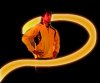
It's all about inner & outer glow adjustment layers actually.
It's all about inner & outer glow adjustment layers actually.
T
thephotoshopninja
Guest
Either way, it is pretty cool and now I know about the light painting 
I think I could do it in PS though.
I think I could do it in PS though.
Yeah, you could probably do something like this using a wide calligraphic brush and a Wacom tablet to create the basic shapes, then screen/overlay them (or something ;-) to get the gradient qualities.
Another option is to use a 3D modeler and render it out as an animated glowing primitive with motion blur and an alpha. Then just drop the proper frame into PShop and apply an appropriate transform to taste.
Another option is to use a 3D modeler and render it out as an animated glowing primitive with motion blur and an alpha. Then just drop the proper frame into PShop and apply an appropriate transform to taste.

Scott20015
Well-Known Member
- Messages
- 46
- Likes
- 1
I have a friend who is an artist...she does light painting.
Check da pic...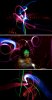
Check da pic...
Scott20015
Well-Known Member
- Messages
- 46
- Likes
- 1

rhstanley3
Well-Known Member
- Messages
- 58
- Likes
- 8
using a camera and not photoshop to achieve this effect will turn out overall better in the end, with a LOT less work, and it's more artistic than just making it in photoshop

Steve
Retired Administrator
- Messages
- 7,720
- Likes
- 1,475
using a camera and not photoshop to achieve this effect will turn out overall better in the end, with a LOT less work, and it's more artistic than just making it in photoshop
+1 ^^^^^
It's light painting. Put the camera in manual mode. Set the shutter speed to "bulb". Have your apeture set at whatever your flash is set for. Do your moving with the glow stick and at the end of the exposure pop the flash. You could even do ALL of it with one person.