-
Junior Member
Changing boat with multiple graphics and colors to all white?
Hello All,
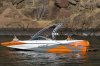
I've been banging my head for the last week trying to change the color of a boat to all white while still maintaining the shadows and luminocity. The boat is composed of a few different colors and graphics, however I'd like to remove all of these so I can create an all white boat.
Any suggestions on how this can be done, if its even possible?
I'm attaching a picture of the boat in question.
Thanks,
Phil
-
-
Junior Member
Re: Changing boat with multiple graphics and colors to all white?
I just realized I posted this in the wrong section.....can a moderator please help me move this to the correct section?
Thanks,
Phil
-
-
Guru
Re: Changing boat with multiple graphics and colors to all white?
moved to to Quick-Tips and Techniques forum
-
-
Guru
Re: Changing boat with multiple graphics and colors to all white?
Attachment 1130you can use the image >ajustments>Hue/Saturation filter
select the organge areras and bring down the levels to with use the white already on the boat to match the color.thats just one way .there are others
-
-
Junior Member
Re: Changing boat with multiple graphics and colors to all white?
Thanks for the tip, I'll definately try this out tonight. Just for clarification, are you saying that I need to select only the orange areas of the boat first and then adjust the hue/saturation? What about for the grey X graphic?
Thanks,
Phil
-
-
Guru
Re: Changing boat with multiple graphics and colors to all white?
I don't think you'll find any quick easy way to do it. I painted with white and added some shadows. It would take time ro do it right, but it could be done.
-
-
Power User
Re: Changing boat with multiple graphics and colors to all white?
[QUOTE=pip9ball;79700]Hello All,
I've been banging my head for the last week trying to change the color of a boat to all white while still maintaining the shadows and luminocity. The boat is composed of a few different colors and graphics, however I'd like to remove all of these so I can create an all white boat.
Any suggestions on how this can be done, if its even possible?
I'm attaching a picture of the boat in question.
Thanks,
Try this link, it's a video opn how to do what I think you are wanting to do 
Photoshop World: Lab Color with Dan Margulis - PixelPerfect
Intel Core 2 Duo Processor Q6600 2.4GHz | Windows 7 Professional | 4GB RAM | Nvidia GeForce 8500 GT 512MB RAM | Photoshop CS4 Extended & Elements 7
-
-
Guru
Re: Changing boat with multiple graphics and colors to all white?
I'll have a look at that tutorial now I've had a go.
If you click on filters, then artistic, then the whiter boat filter........
Last edited by sprucemagoo1; 10-22-2010 at 08:42 PM.
Chad Spruce Carter
-
-
Administrator
Re: Changing boat with multiple graphics and colors to all white?
A variation of iDad'a suggestion.
Copy the layer and instead of Adjustments|Hue and Saturation, create a Hue and Saturation adjustment layer by clicking on the half white half black circle on the bottom of the layers pallet and selecting Hue and Saturation .
Select Red in the pull down menu currently set to Master.
With the eye dropper tool in the adjustment tool, click on the orange area.
Slide Saturation to -100 and lightness to +100
This affects the whole image and it's black and white but the orange is gone.
Select the mask an type Ctrl+I to invert the mask.

Press D to make sure the default colors are selected, make sure white is the foreground color if not press X.
Make sure your layers pallet looks like the image below.
Select the mask in the adjustment layer.
Press B to select the brush, adjust the brush size with the [ and ] keys.
With your brush paint on the orange area to eliminate it.

For the rest you need clone stamp.
-
-
Guru
Re: Changing boat with multiple graphics and colors to all white?
I got Bored!
-
Posting Permissions
- You may not post new threads
- You may not post replies
- You may not post attachments
- You may not edit your posts
Forum Rules
Powered by
vBulletin® Version 4.1.9
Copyright © 2012 vBulletin Solutions, Inc. All rights reserved.
Content Relevant URLs by
vBSEO 3.6.0
Copyright 2011 Photoshop Gurus Forum. All rights reserved.