-
Junior Member
Brushes
How to install Brushes in photoshop..?
More precision, where to place them when they are already downloaded????
-
-
Junior Member
Re: Brushes
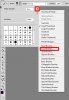
It doesn't really matter where you put them once you download them to your computer. You can save your brushes in any folder(as long as you know where it is). To install into photoshop, go to your brushes panel and click the arrow, then move down to load brushes:
-
-
Senior Member
Re: Brushes
just copy the abr files in C:/prog/adobe/photoshop/presets/brushes and then with the left button with brushes
-
-
Re: Brushes
Or just duble-click "brush file", and Photoshop it will load it automatically!
-
Tags for this Thread
Posting Permissions
- You may not post new threads
- You may not post replies
- You may not post attachments
- You may not edit your posts
Forum Rules
Powered by
vBulletin® Version 4.1.9
Copyright © 2012 vBulletin Solutions, Inc. All rights reserved.
Content Relevant URLs by
vBSEO 3.6.0
Copyright 2011 Photoshop Gurus Forum. All rights reserved.