
Hi,
I am trying to you an action to sharpen photos. Here are the steps I am incorporating into the Action:
1. Resize image;
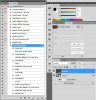
For some reason this Action creates an additional layer (Layer 1) which I do not want. I am trying to build this Action based on a link from a Tutorial found here for Smart Sharpening:
Really Smart Sharpening - Canon Digital Photography Forums
If someone can get this to work as per the Tutorial I would be very greatful.
Thanks a Bunch.
Cheers
Tony
I am trying to you an action to sharpen photos. Here are the steps I am incorporating into the Action:
Smart Sharpening Technique
1. Resize image;
- Convert to a Smart Object;
- Smart Sharpen;
- Click the eyeball to turn it off;
- Select All (Ctrl + A);
- Copy (Ctrl +C);
- While holding down the Option key (Alt for PC) click on the Smart Filters mask box;
- While holding Command (Ctl for PC) and press V;
- Find Edges;
- Open levels (Image / Adjustments / Levels);
- Deselect (Ctrl +D);
- Open the Masks Panel Invert;
- Click the eyeball; and
- Last thing the author mentioned was Gaussian Blur to smoothen out the images. Makes sure the Smart Objects mask box is selected before you open Gaussian Blur. My default is 2.5 but you can adjust to taste.
For some reason this Action creates an additional layer (Layer 1) which I do not want. I am trying to build this Action based on a link from a Tutorial found here for Smart Sharpening:
Really Smart Sharpening - Canon Digital Photography Forums
If someone can get this to work as per the Tutorial I would be very greatful.
Thanks a Bunch.
Cheers
Tony
