+ Reply to Thread
Results 1 to 6 of 6
Like Tree1Likes
  • 1 Post By psyclop

Thread: No background .png

  1. #1
    Member
    Join Date
    Dec 2010
    Location
    Montreal area
    Posts
    30
    Thanks
    2
    Thanked 0 Times in 0 Posts

    No background .png

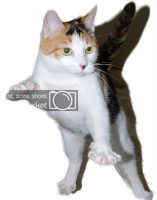
    I took this pic
    No background .png-cadie-action.png
    and try cs5 refine edge with it, then drag the cut image of the cat with no background, on to a new canvas. and save as a png (no background) . but then I've upload it to photobucket, and put it as an avatar on a cat forum. once there the background came back.
    Can someone tell me why ?

  2. #2
    Silly Trucker
    Join Date
    May 2011
    Location
    Trucking the big roads, dust and all.
    Posts
    4,536
    Thanks
    43
    Thanked 228 Times in 223 Posts

    Re: No background .png

    Did you delete the original white background layer, or at least turn it off?


  3. #3
    Member
    Join Date
    Dec 2010
    Location
    Montreal area
    Posts
    30
    Thanks
    2
    Thanked 0 Times in 0 Posts

    Re: No background .png

    Quote Originally Posted by Paul View Post
    Did you delete the original white background layer, or at least turn it off?
    I've put it on a new canvas, the layer on it s own. What I've done doe, is drag the layer to a new canvas. maybe if I do a cut or copy and paste to the new canvas.
    What I've done on this post is a (manage attachement),

    here it seems to work ok, but look here the same IMG code
    Connexion
    Look at the avatar
    Paul likes this.

  4. #4
    Silly Trucker
    Join Date
    May 2011
    Location
    Trucking the big roads, dust and all.
    Posts
    4,536
    Thanks
    43
    Thanked 228 Times in 223 Posts

    Re: No background .png

    nice one funky.


  5. #5
    Guru
    Join Date
    Mar 2010
    Location
    Mesa, Arizona
    Posts
    1,107
    Thanks
    0
    Thanked 71 Times in 70 Posts

    Re: No background .png

    Did you use save for web, and checkmark transparency?

  6. #6
    Member
    Join Date
    Dec 2010
    Location
    Montreal area
    Posts
    30
    Thanks
    2
    Thanked 0 Times in 0 Posts

    Re: No background .png

    Quote Originally Posted by hawkeye View Post
    Did you use save for web, and checkmark transparency?
    No I just save as .png with no background


Tags for this Thread

Posting Permissions

  • You may not post new threads
  • You may not post replies
  • You may not post attachments
  • You may not edit your posts
Powered by vBulletin® Version 4.1.9
Copyright © 2012 vBulletin Solutions, Inc. All rights reserved.
Content Relevant URLs by vBSEO 3.6.0
Copyright 2011 Photoshop Gurus Forum. All rights reserved.
All times are GMT -5. The time now is 07:56 AM.
vBulletin Skins