+ Reply to Thread
Results 1 to 8 of 8
  1. #1
    Member
    Join Date
    Oct 2011
    Posts
    33
    Thanks
    12
    Thanked 0 Times in 0 Posts

    Filling elipses tool with colour

    Hi there,

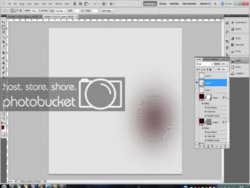
    I'm trying to fill my elipses with a colour - when I right click and choose fill, it doesn't fill it correctly - it merely does as the image below. What am I doing wrong?

    Thanks


  2. #2
    Guru
    Join Date
    Apr 2011
    Location
    born in U.S.S.R.
    Posts
    1,742
    Thanks
    36
    Thanked 120 Times in 112 Posts

    Re: Filling elipses tool with colour

    Change Feather=100px to 0px or one you want (in options panel, you can see it under menu panel).
    Rather than love, than money, than fame, give me truth. © Henry David Thoreau

  3. #3
    Member
    Join Date
    Oct 2011
    Posts
    33
    Thanks
    12
    Thanked 0 Times in 0 Posts

    Re: Filling elipses tool with colour

    Just tried that and I'm getting the same result - I did think that may have been the issue but when I change the feather it does nothing.

    I'm obviously doing something blatantly daft - but can't figure it out. I just keep getting the same result and not filling the circle with the block of colour that I want.

    Thanks for coming back to me btw.

  4. #4
    Member
    Join Date
    Oct 2011
    Posts
    33
    Thanks
    12
    Thanked 0 Times in 0 Posts

    Re: Filling elipses tool with colour

    Panic over - not sure exactly what I did but I did it somehow using the paintbucket tool.

    Great for now but when I have the same problem again I'll be buggered! Thanks!

  5. #5
    Guru
    Join Date
    Apr 2011
    Location
    born in U.S.S.R.
    Posts
    1,742
    Thanks
    36
    Thanked 120 Times in 112 Posts

    Re: Filling elipses tool with colour

    Once you drawed eclipse or marque with feather settings any change in options will not change anything to allready drawed one. So you need change feather before you make eclipse. Should work.
    Rather than love, than money, than fame, give me truth. © Henry David Thoreau

  6. The Following User Says Thank You to SeniorS For This Useful Post:

    steves (12-06-2011)

  7. #6
    Member
    Join Date
    Dec 2011
    Location
    Cambridge UK
    Posts
    30
    Thanks
    0
    Thanked 5 Times in 5 Posts

    Re: Filling elipses tool with colour

    Glad to hear that your problem is sorted out this time. If it helps at all, a short cut to filling a selection with solid colour is...

    Make your selection
    Add a feather to the selection using Refine Edge
    Choose the colour you want as the fill (Foreground colour)
    Hit Alt + Backspace on the keyboard.

    Your selection will now be filled with whatever the foreground colour is.

    ...YOU KNOW IT MAKES SENSE...

  8. The Following User Says Thank You to PseFrank For This Useful Post:

    steves (12-06-2011)

  9. #7
    Forum Mod
    Join Date
    Jun 2011
    Location
    Imperial Beach, CA, US
    Posts
    3,566
    Thanks
    97
    Thanked 218 Times in 217 Posts

    Re: Filling elipses tool with colour

    Make sure you do not have fixed ratio checked and the feather is zero as already said

  10. The Following User Says Thank You to ibclare For This Useful Post:

    steves (12-06-2011)

  11. #8
    Member
    Join Date
    Oct 2011
    Posts
    33
    Thanks
    12
    Thanked 0 Times in 0 Posts

    Re: Filling elipses tool with colour

    Thanks to you all!


Tags for this Thread

Posting Permissions

  • You may not post new threads
  • You may not post replies
  • You may not post attachments
  • You may not edit your posts
Powered by vBulletin® Version 4.1.9
Copyright © 2012 vBulletin Solutions, Inc. All rights reserved.
Content Relevant URLs by vBSEO 3.6.0
Copyright 2011 Photoshop Gurus Forum. All rights reserved.
All times are GMT -5. The time now is 08:19 AM.
vBulletin Skins