+ Reply to Thread
Results 1 to 5 of 5
  1. #1
    Member
    Join Date
    Oct 2011
    Posts
    33
    Thanks
    12
    Thanked 0 Times in 0 Posts

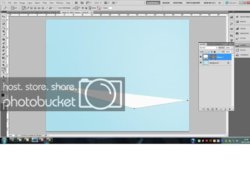
    Can anyone explain why this is happening?

    When I use a pen tool it automatically colours in the outside of the area I'm drawing. Probably something very obvious - but can't figure it out! Attached a screen grab below.

    Cheers.


  2. #2
    Member
    Join Date
    Nov 2011
    Posts
    58
    Thanks
    6
    Thanked 4 Times in 4 Posts

    Re: Can anyone explain why this is happening?

    If I was to guess I"d say It"s creating a mask.

  3. The Following User Says Thank You to Jenny For This Useful Post:

    steves (12-08-2011)

  4. #3
    Administrator
    Join Date
    Jul 2010
    Location
    New Jersey, USA
    Posts
    4,740
    Thanks
    12
    Thanked 160 Times in 150 Posts

    Re: Can anyone explain why this is happening?

    On the pen tool bar select "Paths", the 2nd from the left.
    You have "Shape Layers" selected.

  5. The Following User Says Thank You to Steve For This Useful Post:

    steves (12-08-2011)

  6. #4
    Member
    Join Date
    Oct 2011
    Posts
    33
    Thanks
    12
    Thanked 0 Times in 0 Posts

    Re: Can anyone explain why this is happening?

    Thanks for coming back to me - the thing is I had planned to fill the are abelow with a different colour so I presumed I had to have it on shape layers?

  7. #5
    Banned
    Join Date
    Nov 2011
    Location
    Croatia
    Posts
    66
    Thanks
    2
    Thanked 8 Times in 8 Posts

    Re: Can anyone explain why this is happening?

    No. You can see your active paths in the menu, it should be right beside your layer tab (by default).
    From there, you can CTRL - click on a path, to select it.
    Now, just make a new layer, and fill it with any color you want.

    But, this way you don't get vector shapes, so beware.


Tags for this Thread

Posting Permissions

  • You may not post new threads
  • You may not post replies
  • You may not post attachments
  • You may not edit your posts
Powered by vBulletin® Version 4.1.9
Copyright © 2012 vBulletin Solutions, Inc. All rights reserved.
Content Relevant URLs by vBSEO 3.6.0
Copyright 2011 Photoshop Gurus Forum. All rights reserved.
All times are GMT -5. The time now is 08:26 AM.
vBulletin Skins