-
Re: Background is GRAY....or grey....
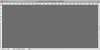
It's the same whether I open an existing file or a new one.

-
-
Forum Mod
Re: Background is GRAY....or grey....
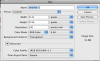
go back to post 10 and check that the bottom option of my image matches your colour scheme
-
-
Re: Background is GRAY....or grey....
OK, I've reopened a number of files that have been fine in the past. They are now gray.
-
-
Forum Mod
Re: Background is GRAY....or grey....
The last idea i have is go to edit preferences select the performance and turn off open gl
Have you had a graphics card update
-
-
Re: Background is GRAY....or grey....
Well, that didn't make a difference either. However, you mentioned the graphics card........ I've been using a friend's computer for the last couple of months and have had some strange things happen. Yesterday, I couldn't use the keyboard. It wouldn't type. Had to do a complete restart. Now I am wondering if the problem isn't mine and is actually the computer itself. Makes me think a little differently now.........hmmmm.......
-
-
Re: Background is GRAY....or grey....
thanks for all the help! I am off to see what I can find out about the graphics card and to see about getting my old computer back! Take care and I will see you in the forums!
-
-
Forum Mod
Re: Background is GRAY....or grey....
Well hopefully it is nothing to serious or maybe with the sales it could be time for an upgrade.
-
Tags for this Thread
Posting Permissions
- You may not post new threads
- You may not post replies
- You may not post attachments
- You may not edit your posts
Forum Rules
Powered by
vBulletin® Version 4.1.9
Copyright © 2012 vBulletin Solutions, Inc. All rights reserved.
Content Relevant URLs by
vBSEO 3.6.0
Copyright 2011 Photoshop Gurus Forum. All rights reserved.