+ Reply to Thread
Results 1 to 10 of 10
  1. #1
    Junior Member
    Join Date
    Jan 2012
    Posts
    5
    Thanks
    0
    Thanked 0 Times in 0 Posts

    Inner inset stroke that follows shape of object

    I need to create a thin accent line inside of a shape.

    Like this:

    Inner inset stroke that follows shape of object-dribbble.jpg

    See the thin accent line inside of the ticket shape?

    How do I do this?

    Thanks!

  2. #2
    Senior Member
    Join Date
    Mar 2011
    Location
    Belgium
    Posts
    123
    Thanks
    1
    Thanked 21 Times in 20 Posts

    Re: Inner inset stroke that follows shape of object

    select the shape
    scale the selection
    stroke the selection

  3. #3
    Junior Member
    Join Date
    Jan 2012
    Posts
    5
    Thanks
    0
    Thanked 0 Times in 0 Posts

    Re: Inner inset stroke that follows shape of object

    When you say, "scale the selection," what do you mean?

    When apply an inner stroke I do not get the desired effect. That was the first thing I tried

  4. #4
    Senior Member
    Join Date
    Mar 2011
    Location
    Belgium
    Posts
    123
    Thanks
    1
    Thanked 21 Times in 20 Posts

    Re: Inner inset stroke that follows shape of object

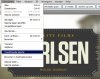
    go to selection-- transform selection , and you can scale the selection to 95%

    Inner inset stroke that follows shape of object-selection.jpg

  5. #5
    Junior Member
    Join Date
    Jan 2012
    Posts
    5
    Thanks
    0
    Thanked 0 Times in 0 Posts

    Re: Inner inset stroke that follows shape of object

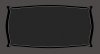
    Just to clarify, this is what I get when I apply a white inner stroke to a black object:
    Inner inset stroke that follows shape of object-shape.jpg

    I need the white line to be inset a few pixels...just like this ticket image I posted above.

  6. #6
    Junior Member
    Join Date
    Jan 2012
    Posts
    5
    Thanks
    0
    Thanked 0 Times in 0 Posts

    Re: Inner inset stroke that follows shape of object

    I want this shape to be a vector object. So when I make a duplicate of the shape and free transform the shape slightly smaller, then add a white stroke to the smaller shape it looks like this:

    Inner inset stroke that follows shape of object-transformed.jpg

  7. #7
    Senior Member
    Join Date
    Mar 2011
    Location
    Belgium
    Posts
    123
    Thanks
    1
    Thanked 21 Times in 20 Posts

    Re: Inner inset stroke that follows shape of object

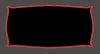
    you can see that in the corner it gets much sharper
    you can strke the selection on a new layer with 5 or 10 pixels
    and then troke this shape with 1 pixel and remove the red shape

    Inner inset stroke that follows shape of object-shape.jpg

  8. #8
    Junior Member
    Join Date
    Jan 2012
    Posts
    5
    Thanks
    0
    Thanked 0 Times in 0 Posts

    Re: Inner inset stroke that follows shape of object

    I can't get this method to work for me. The edges are too sharp, and they aren't lining up like the example I posted. Is there another way?

  9. #9
    Senior Member
    Join Date
    Mar 2011
    Location
    Belgium
    Posts
    123
    Thanks
    1
    Thanked 21 Times in 20 Posts

    Re: Inner inset stroke that follows shape of object

    maybe like this ,
    shape is a little bit adapted at the corners

    Inner inset stroke that follows shape of object-shapee.jpg

  10. #10
    Member
    Join Date
    Jan 2012
    Location
    New Delhi, India
    Posts
    82
    Thanks
    0
    Thanked 4 Times in 4 Posts

    Re: Inner inset stroke that follows shape of object

    Pretty easy if you ask me!
    Maybe won't work on complex shapes, but you can always try

    - Ctrl+Click on layer to select it.
    - Go to select menu -> Modify -> Contract.
    - Depending on the size of the image, enter pixels that you would like to shorten.
    - Fill the selection with the color you want for the thin line.
    - Again, contract the selection a bit (as much as the width of the thin line).
    - Press Delete.

    Done!
    Hope I helped
    Last edited by dv8_fx; 01-28-2012 at 11:09 AM. Reason: adjust font color
    ::Namanyay Goel
    ::Freelance Graphic Designer and Web Designer.
    ::Technologically Sane (Blog)


Posting Permissions

  • You may not post new threads
  • You may not post replies
  • You may not post attachments
  • You may not edit your posts
Powered by vBulletin® Version 4.1.9
Copyright © 2012 vBulletin Solutions, Inc. All rights reserved.
Content Relevant URLs by vBSEO 3.6.0
Copyright 2011 Photoshop Gurus Forum. All rights reserved.
All times are GMT -5. The time now is 10:08 AM.
vBulletin Skins