+ Reply to Thread
Results 1 to 9 of 9

Thread: Text style help

  1. #1
    Junior Member
    Join Date
    Jan 2012
    Posts
    12
    Thanks
    1
    Thanked 0 Times in 0 Posts

    Text style help

    Having problems producing a good looking "Golf Ball" text style. does anybody have some tips or ideas? Thanks in advance!

  2. #2
    Forum Mod
    Join Date
    Mar 2002
    Location
    Here... ?
    Posts
    4,991
    Thanks
    10
    Thanked 191 Times in 189 Posts

    Re: Text style help

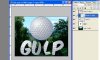
    I don't know of any golf ball font. But you can do this.... Get a golf ball image.

    Create a clipping layer as my capture shows. With the golfball layer above the text layer, ALT+click the heavy line between the two layers.

    Text style help-gulp.jpg

    There's your golf ball text style.... hope this helps.

  3. #3
    Junior Member
    Join Date
    Jan 2012
    Posts
    12
    Thanks
    1
    Thanked 0 Times in 0 Posts

    Re: Text style help

    Thanks! I have done that already and just doesn't look quite correct. I was wondering if there was a way to make my own texture with the dimples and shadows then apply that.

  4. #4
    Forum Mod
    Join Date
    Mar 2002
    Location
    Here... ?
    Posts
    4,991
    Thanks
    10
    Thanked 191 Times in 189 Posts

    Re: Text style help

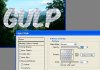
    If you're patient enuf to create a tile pattern or can find a tileable golf ball pattern, use a Pattern Layer style.

    OPen your tile image then MENU>EDIT>DEFINE PATTERN to create a pattern for PS. Aplly the layer style.

    Text style help-gulp3-copy.jpg

    My example is a shortcut, I used the golfball image ... lol... all you need is a small tile pattern ...

  5. #5
    Forum Mod
    Join Date
    Mar 2002
    Location
    Here... ?
    Posts
    4,991
    Thanks
    10
    Thanked 191 Times in 189 Posts

    Re: Text style help

    I deduce you want dimples on a flat plane. Create layer copies of a dimple you like. and move them around in the image to get the tile pattern you need. And then save as a pattern using the step outlined above.

  6. #6
    Junior Member
    Join Date
    Jan 2012
    Posts
    12
    Thanks
    1
    Thanked 0 Times in 0 Posts

    Re: Text style help

    That may be the way to go. Was just wondering if anybody had an easy way. Thanks for the ideas though.

  7. #7
    Forum Mod
    Join Date
    Mar 2002
    Location
    Here... ?
    Posts
    4,991
    Thanks
    10
    Thanked 191 Times in 189 Posts

    Re: Text style help

    Here's a pattern.... Text style help-otb_737_5003.jpg you may have to touch it up - contrast, levels to get it to look right.

  8. #8
    Junior Member
    Join Date
    Jan 2012
    Posts
    12
    Thanks
    1
    Thanked 0 Times in 0 Posts

    Re: Text style help

    Thank you I will give it a go.

  9. #9
    Forum Mod
    Join Date
    Mar 2002
    Location
    Here... ?
    Posts
    4,991
    Thanks
    10
    Thanked 191 Times in 189 Posts

    Re: Text style help

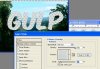
    Text style help-gulp4.jpg ............

  10. The Following User Says Thank You to dv8_fx For This Useful Post:

    Zombie (01-29-2012)


Posting Permissions

  • You may not post new threads
  • You may not post replies
  • You may not post attachments
  • You may not edit your posts
Powered by vBulletin® Version 4.1.9
Copyright © 2012 vBulletin Solutions, Inc. All rights reserved.
Content Relevant URLs by vBSEO 3.6.0
Copyright 2011 Photoshop Gurus Forum. All rights reserved.
All times are GMT -5. The time now is 10:17 AM.
vBulletin Skins