
3Likes
-
1
Post By ibclare
-
2
Post By SCTRWD
-
Linking an Adjustment Layer to two separate layers
Hello,
I am wondering if there is a way to create an adjustment layer that only affects two layers that are spread apart. What I'd like to be able to do is change the color of both layers at the same time.
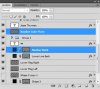
The problem is, I can't group the layers together and add an adjustment to the group because one of the layers (Number Color Flare) has to stay on top of the rest.
Hopefully this makes sense to everyone. Any suggestions?
-
-
Guru
Re: Linking an Adjustment Layer to two separate layers
Why don't you create 2 separate adjustment layers ?
-
-
Re: Linking an Adjustment Layer to two separate layers

Originally Posted by
Evil Nemesis
Why don't you create 2 separate adjustment layers ?
Well, I'm trying to have the two linked, that way when I change one, the other changes as well. I'm trying to streamline the process of changing colors on a lower third graphic.
-
-
Queen Bee
Re: Linking an Adjustment Layer to two separate layers
As far as I know, it can't be done if they aren't grouped together. I do know what you're saying. All I can suggest is to change one, then copy the adjustment layer to the other. Some actions don't have shortcuts.
I'd love to learn otherwise if I'm wrong.
-
-
Guru
Re: Linking an Adjustment Layer to two separate layers
You're not wrong clare, this can't be done I'm not sure if linking the layers or changing the blend mode from pass through would do any good as I'm in office right now and don't have photoshop installed.
-
-
Power User
Re: Linking an Adjustment Layer to two separate layers
It can not be done in general. But if you simply want to change colors of different layers you can use Smart Objects:
Add Solid Color layer above one of your layers. Clip them in a Clipping group. Convert color layer to Smart Object.
Copy Smart Object over another layer. Clip them in a Clipping group. Repeat this process for every layer you want to change color.
Now you can just open Smart Object layer, change it's color, save and see all your layers change their colors.
-
Posting Permissions
- You may not post new threads
- You may not post replies
- You may not post attachments
- You may not edit your posts
Forum Rules
Powered by
vBulletin® Version 4.1.9
Copyright © 2013 vBulletin Solutions, Inc. All rights reserved.
Content Relevant URLs by
vBSEO 3.6.0
Copyright 2011 Photoshop Gurus Forum. All rights reserved.
All times are GMT -5. The time now is 10:18 AM.