3Likes
-
3
Post By tairygreen
-
Junior Member
how to shape my text inside a figure

Hey everyone,
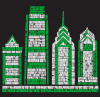
This is a good example of what I want to accomplish. Is there a faster way than having the image on a background layer and positioning all the text word by word? I want to do this for the state o hawaii and have the cities make up the islands. There 8 islands and it gets to be a little much jus word by word.
Thanks in advance everyone.
Shawn
-
-
Guru
Re: how to shape my text inside a figure
You can make a shape with the pen tool and paste text into it which will conform (more or less) to the shape.
-
The Following User Says Thank You to hawkeye For This Useful Post:
-
Junior Member
Re: how to shape my text inside a figure
thanks hawkeye,
my main goal is to take away the shape and let the text make the shape Will that work with it conformed to a shape or will that delete the text when I get rid of the shape.
Also, can I pull this same process off in Illustrator ?
-
-
Guru
Re: how to shape my text inside a figure
Hey Shawn,
Using the pen tool or a custom shape tool works really well for some text within shape processes, unfortunately, I don't think it will work in this circumstance other than serving as an outline from which to form the text unless you want your text all going in the same direction and not conforming to the outline very well.
If your truly going for the same effect as you show in your example, it will take time and patience by creating text, rastorizing, and then placing the text/words in exact places and then using almost all of the transform tools (maybe the Liquify filter) in order to mold the text to the shape of the islands using the shape outlines on separate layers as guide that can be turned off later.
Good luck.
-
The Following User Says Thank You to IamSam For This Useful Post:
-
Guru
Re: how to shape my text inside a figure
I agree with Sam, Pen tool always comes to the rescue but not in this case. You would have to type the text, rasterize the layer, Use transformation followed by Warp or Liquify tool to achieve the desired effect.
-
-
Junior Member
Re: how to shape my text inside a figure
I appreciate all the input, THe pen tool is not going to work for this idea I have come to realize. I have start on the design and like where its going, it is just going to take me a little bit of time. Here what I've got so far.

Only 7 more islands in the chain to go.
Shawn
-
-
Guru
Re: how to shape my text inside a figure
Shawn, this looks cool.. I am anxious to see the end result
-
The Following User Says Thank You to chitkaran For This Useful Post:
-
Queen Bee
Re: how to shape my text inside a figure
tairygreen, yep, it's going to take some time, but it's worth it! Very nice so far.
Are you doing this for an official purpose or just for fun? Some other reason?
-
-
Junior Member
Re: how to shape my text inside a figure
thank you, thank you,
It is actually a design for a clothing line. I'm headed out there in two weeks. Would like to be wearing it on a shirt by then.
-
-
Queen Bee
Re: how to shape my text inside a figure
Nice. I'm sure you will be.
-
Tags for this Thread
Posting Permissions
- You may not post new threads
- You may not post replies
- You may not post attachments
- You may not edit your posts
Forum Rules
Powered by
vBulletin® Version 4.1.9
Copyright © 2013 vBulletin Solutions, Inc. All rights reserved.
Content Relevant URLs by
vBSEO 3.6.0
Copyright 2011 Photoshop Gurus Forum. All rights reserved.
All times are GMT -5. The time now is 12:31 AM.