What's new
Photoshop Gurus Forum

Welcome to Photoshop Gurus forum. Register a free account today to become a member! It's completely free. Once signed in, you'll enjoy an ad-free experience and be able to participate on this site by adding your own topics and posts, as well as connect with other members through your own private inbox!

Painting an object.


johnsilvia

Well-Known Member
Messages
69
Likes
0
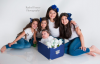
Hey good day guys. I was wondering if I can paint the brown box with blue but still keep the texture. :question:image.jpg

 
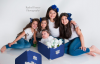
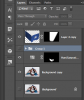
I made a selection of the box with the pen tool. I then added a hue & Sat layer and colorized the box. Since this adds a mask, I also used a hard brush with black to clean up the silver corners and the handle. There's already a nice reflection in the original.

FamilyBlue_02.png

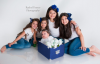
For fun, I thought I would try inkpads idea of adding a reflection.............this proved to be chore! I first combined the Hue & Sat layer with a copy of the original and since I had the box already selected, I copied the blue box to it's own layer. Flipping the box was a challenge! Maybe someone else can tell me how this can be accomplished easily!!!!

FamilyBlue_03.png

I ended up splitting the copied blue box into two sections and using almost all of the transform functions to match the reflection to the box! It's not perfect and the reflection is off but I'm satisfied with the results. I then added a layer mask and used the Gradient tool to blend the reflection! I lowered it's opacity as well. It is what it is.

FamilyBlue_01.png

Screen Shot 2013-06-10 at 4.53.46 PM.png
 
Last edited:
I love the photo. Very nice composition
 
Paul said:
Blues are way too over saturated for my liking.

Mine are for sure. I made a quick change for the demo only and wasn't to worried about the outcome. I think I tried to get close to the color of the bows.
 

Back
Top