5Likes
-
Guru
Greenish Girls
This is my latest thingy lol. I kind of like it for once, but I think I should maybe have had something over their heads to look at, but I ran out space up there lol. I have heard that you can somehow make more canvas space by using the crop tool or something, but I donīt remember how. If anyone knows please tell me
-
-
Guru
Re: Greenish Girls
Oh no not again! I donīt understand why some things I post here turn out all blurry, itīs only some things not everything, I donīt get it grrr.
-
-
Silly Trucker
Re: Greenish Girls
Still got a nice nostalgic appeal/look to it mate.
-
-
Guru
Re: Greenish Girls

Originally Posted by
Belial
Still got a nice nostalgic appeal/look to it mate.
Thank you Belial!
-
-
Silly Trucker
Re: Greenish Girls
You're welcome, you should have a go at bank notes mate.
-
-
Guru
Re: Greenish Girls

Originally Posted by
Vafann
I have heard that you can somehow make more canvas space by using the crop tool or something...
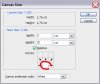
One method. In menu Image/Canvas Size...

Grow as needed.
Second method with crop tool. For first time setting crop area it bound to document size automaticly but if you release it and start to seting crop area agin you can go out of document size. And then just crop it'll "add" area which is outside document but inside crop.
First method is more precise but with second you can adjust on you art sence. Your call
Rather than love, than money, than fame, give me truth. Đ Henry David Thoreau
-
The Following User Says Thank You to SeniorS For This Useful Post:
-
Guru
Re: Greenish Girls

Originally Posted by
Belial
You're welcome, you should have a go at bank notes mate.
Lol! I see what you mean!
-
-
Guru
Re: Greenish Girls

Originally Posted by
SeniorS
One method. In menu Image/Canvas Size...
Attachment 7668
Grow as needed.
Second method with crop tool. For first time setting crop area it bound to document size automaticly but if you release it and start to seting crop area agin you can go out of document size. And then just crop it'll "add" area which is outside document but inside crop.
First method is more precise but with second you can adjust on you art sence. Your call

Thank you Senior S! Yes! that sounds like what I remember, I will save this for reference!
-
-
Forum Mod
Re: Greenish Girls
I like it as it is soft effect it could be your monitor settings. by the way you can crop the image on the canvas select it all but before you apply it you get corner boxes like the transform tools just extend it and it will create the larger canvas
-
-
Forum Mod
Re: Greenish Girls
I found it I did a quick tutorial a while back on this but forgot to mention when transforming the canvas if you hold down the alt key and extend in then it will keep your image centered still
-
The Following User Says Thank You to Hoogle For This Useful Post:
Tags for this Thread
Posting Permissions
- You may not post new threads
- You may not post replies
- You may not post attachments
- You may not edit your posts
Forum Rules
Powered by
vBulletin® Version 4.1.9
Copyright © 2012 vBulletin Solutions, Inc. All rights reserved.
Content Relevant URLs by
vBSEO 3.6.0
Copyright 2011 Photoshop Gurus Forum. All rights reserved.