+ Reply to Thread
Page 1 of 2 12 LastLast
Results 1 to 10 of 13
Like Tree9Likes

Thread: UneXplained

  1. #1
    Junior Member
    Join Date
    Nov 2011
    Location
    Dublin
    Posts
    26
    Thanks
    14
    Thanked 0 Times in 0 Posts

    UneXplained

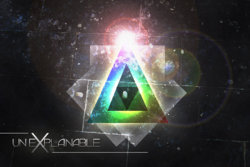
    Hey there, my first post on this forum. And it's bizarre... Was following a tutorial and after finishing it I decided to play with it and add texture and text... Please critique and suggest what you would add. I'm having trouble with typography mostly in my opinion!
    UneXplained-tutcolorfulagedposter3.jpg

  2. #2
    Forum Mod
    Join Date
    Jun 2011
    Location
    Imperial Beach, CA, US
    Posts
    3,567
    Thanks
    97
    Thanked 218 Times in 217 Posts

    Re: UneXplained

    Very cool. When you get enough posts to give us a link, do that OK? I wouldn't add anything. It's well balanced and anymore would just be gilding the lily.As for the text, maybe it is just too large. Competes with the image.
    Since you asked

  3. The Following User Says Thank You to ibclare For This Useful Post:

    AdrijusG (11-01-2011)

  4. #3
    Junior Member
    Join Date
    Nov 2011
    Location
    Dublin
    Posts
    26
    Thanks
    14
    Thanked 0 Times in 0 Posts

    Re: UneXplained

    Quote Originally Posted by ibclare View Post
    Very cool. When you get enough posts to give us a link, do that OK? I wouldn't add anything. It's well balanced and anymore would just be gilding the lily.As for the text, maybe it is just too large. Competes with the image.
    Since you asked

    Haha.. good point actually. It should be smaller!

    And I will link to my new works on DeviantArt account if that's allowed. I need one more post so I will be able to post links..

  5. #4
    Guru
    Join Date
    Jun 2009
    Location
    A, A
    Posts
    738
    Thanks
    13
    Thanked 50 Times in 50 Posts

    Re: UneXplained

    It looks great, though I think I would have kept the text colour a bit more of a solid colour, and maybe a bit brighter. Excellent work!

    "EDIT"

    After playing around with it in Photoshop, I take back what I said about the text, it just needs more contrast. I hope you don't mind me showing you what I mean!

    UneXplained-aroodslhk.jpg
    Last edited by sprucemagoo1; 11-01-2011 at 10:02 PM.
    AdrijusG likes this.
    Chad Spruce Carter


  6. The Following User Says Thank You to sprucemagoo1 For This Useful Post:

    AdrijusG (11-02-2011)

  7. #5
    Guru
    Join Date
    Jan 2011
    Location
    Elizabeth Port NJ
    Posts
    1,503
    Thanks
    15
    Thanked 149 Times in 143 Posts

    Re: UneXplained

    Nicely done AdrijusG

    I'll suggest sharpening the image a bit, sharpening makes all things look better.

    Keep it up.
    ibclare likes this.
    Cuando soy Bueno, soy muy BUENO
    Pero cuando soy malo, soy mucho MEJOR

  8. #6
    Junior Member
    Join Date
    Nov 2011
    Location
    Bandung, Indonesia
    Posts
    7
    Thanks
    0
    Thanked 0 Times in 0 Posts

    Re: UneXplained

    Nice, What is the topic of the tutorial about ?, I don't really understand what you want to tell in this graphic art (tell me please, curious )

    IMO (if I may) the effects are great and looks like using complex technique, very nice, although the middle lights are too much, and about the text, yes it is bugging me because it's too big, I would be comfortable to resize it to around 35 or 50% ish to be putted on the left (or right) bottom of the picture and not touching the triangles / main object.

  9. #7
    Guru
    Join Date
    Jun 2009
    Location
    A, A
    Posts
    738
    Thanks
    13
    Thanked 50 Times in 50 Posts

    Re: UneXplained

    Just to let you know, this is the graphic design showroom, where people can show their work off, get critique and praise for well achieved effects and what not.
    Chad Spruce Carter


  10. #8
    Junior Member
    Join Date
    Nov 2011
    Location
    Dublin
    Posts
    26
    Thanks
    14
    Thanked 0 Times in 0 Posts

    Re: UneXplained

    Quote Originally Posted by sprucemagoo1 View Post
    It looks great, though I think I would have kept the text colour a bit more of a solid colour, and maybe a bit brighter. Excellent work!

    "EDIT"

    After playing around with it in Photoshop, I take back what I said about the text, it just needs more contrast. I hope you don't mind me showing you what I mean!
    Yup, definitely looks better! You and M4x1mu$ are right! I will change up the text too.

  11. #9
    Junior Member
    Join Date
    Nov 2011
    Location
    Dublin
    Posts
    26
    Thanks
    14
    Thanked 0 Times in 0 Posts

    Re: UneXplained

    Quote Originally Posted by Windo View Post
    Nice, What is the topic of the tutorial about ?, I don't really understand what you want to tell in this graphic art (tell me please, curious )

    IMO (if I may) the effects are great and looks like using complex technique, very nice, although the middle lights are too much, and about the text, yes it is bugging me because it's too big, I would be comfortable to resize it to around 35 or 50% ish to be putted on the left (or right) bottom of the picture and not touching the triangles / main object.
    I've no idea what is this about lol

    The original tutorial teaches how to make an aged poster. It's here:

    Create a Colorful Aged Poster With Special Lighting Effects | Tutorial9

    I'm just doing tutorials to see different techniques, make a lot of graphic work and then slowly come up with my own style.

  12. #10
    Junior Member
    Join Date
    Nov 2011
    Location
    Dublin
    Posts
    26
    Thanks
    14
    Thanked 0 Times in 0 Posts

    Re: UneXplained

    Here is updated version of it:
    $1r_M4x1mu$ and ibclare like this.


Tags for this Thread

Posting Permissions

  • You may not post new threads
  • You may not post replies
  • You may not post attachments
  • You may not edit your posts
Powered by vBulletin® Version 4.1.9
Copyright © 2012 vBulletin Solutions, Inc. All rights reserved.
Content Relevant URLs by vBSEO 3.6.0
Copyright 2011 Photoshop Gurus Forum. All rights reserved.
All times are GMT -5. The time now is 12:38 PM.
vBulletin Skins