
Been trying to combine layers out of 4 Photos, the background, being a stone wall, with three other photo layer set onto wall, I can get the photos across the top of photoshop, but for some reason, I can not get them into the right hand bracket of photoshop all at the same time, one at a time yes but not all at the same time, can anyone help
Photoshop Gurus Forum
Welcome to Photoshop Gurus forum. Register a free account today to become a member! It's completely free. Once signed in, you'll enjoy an ad-free experience and be able to participate on this site by adding your own topics and posts, as well as connect with other members through your own private inbox!
You are using an out of date browser. It may not display this or other websites correctly.
You should upgrade or use an alternative browser.
You should upgrade or use an alternative browser.

Vafann
Guru
- Messages
- 1,334
- Likes
- 367
Been trying to combine layers out of 4 Photos, the background, being a stone wall, with three other photo layer set onto wall, I can get the photos across the top of photoshop, but for some reason, I can not get them into the right hand bracket of photoshop all at the same time, one at a time yes but not all at the same time, can anyone help
Hello ukwrecker! I don´t understand what you mean.
"I can not get them into the right hand bracket of photoshop all at the same time"
What do you mean you are trying to do? get all of the photos on to one layer?


Hoogle
Guru
- Messages
- 7,940
- Likes
- 2,488
open up photoshop without an image then highlight all the pictures you want to import click and drag them in. Photoshop will create a new canvas based on 1 of the images and then put all the other images as layers above it as smart objects. However you have to press the green tick at the top of the screen to place the file after each 1 is imported before it will import the next 1
Vafann
Guru
- Messages
- 1,334
- Likes
- 367
Tried it then and I have just tried it again, I can not drag them into Photoshop as for some reason photoshop will not let me, I can sellect the photos I want, but again it will only show me me photo at a time when I highlight them at the top of photoshop
Can you post a screen shot? It will be easier to help you if we can see it.
Can you post a screen shot? It will be easier to help you if we can see it.
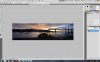
Ok this is the screen capture

dv8_fx
Retired Administrator
- Messages
- 12,219
- Likes
- 3,713
Tried it then and I have just tried it again, I can not drag them into Photoshop as for some reason photoshop will not let me, I can sellect the photos I want, but again it will only show me me photo at a time when I highlight them at the top of photoshop
Make sure the images are in RGB not index and that they are in 8 bit mode (?) ......

hawkeye
Guru
- Messages
- 2,186
- Likes
- 1,054
I think what you are referring to as the right hand bracket is the layers palette. It will only show the layers for the currently selected image. It would be easier in my opinion if you use Float All In Windows rather than the tabbed interface (see the screenshot).
Arrange the images so the source image and target image can both be seen.
With the move tool, drag the layer from the layers palette of the open image (source) into the other (target).
Arrange the images so the source image and target image can both be seen.
With the move tool, drag the layer from the layers palette of the open image (source) into the other (target).
Hoogle
Guru
- Messages
- 7,940
- Likes
- 2,488
Ok I am getting confused
Try this go to file> scripts> load files into stack
Then you should get a pop up window asking you to select the images you want to import then phhotoshop will import them stacked on top of each other on there own layers. Unless you have different image modes ie RGB, CMYK, Grayscale I think then it might not work.
Try this go to file> scripts> load files into stack
Then you should get a pop up window asking you to select the images you want to import then phhotoshop will import them stacked on top of each other on there own layers. Unless you have different image modes ie RGB, CMYK, Grayscale I think then it might not work.