Hello All,
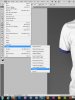
I tried searching he forum but could not find an answer. I have the academic version of Adobe Design Standard 5.5. My question is this: I want to use the script statistics to stack photos in photoshop CS5. But I do not see the tab for statistics under scripts. Is it possible for me to somehow install this or am I out of luck?
Thank you.
I tried searching he forum but could not find an answer. I have the academic version of Adobe Design Standard 5.5. My question is this: I want to use the script statistics to stack photos in photoshop CS5. But I do not see the tab for statistics under scripts. Is it possible for me to somehow install this or am I out of luck?
Thank you.