+ Reply to Thread
Page 1 of 2 12 LastLast
Results 1 to 10 of 15
Like Tree3Likes

Thread: how to edit this kind of color to my photos ??

  1. #1
    Junior Member
    Join Date
    Nov 2011
    Location
    Honolulu
    Posts
    9
    Thanks
    4
    Thanked 1 Time in 1 Post

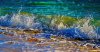
    how to edit this kind of color to my photos ??

    Hi I shoot a lot of waves and would like the end product to look like the picture i posted how would I go by processing them that the water looks like that ? I tried everything and I need help . thanks .how to edit this kind of color to my photos ??-fullscreen-capture-1112011-102127-pm.jpgClick image for larger version

Name:	Fullscreen capture 1112011 102127 PM.jpg
Views:	1
Size:	257.5 KB
ID:	10339

  2. #2
    Guru
    Join Date
    Jan 2011
    Location
    Elizabeth Port NJ
    Posts
    1,503
    Thanks
    15
    Thanked 149 Times in 143 Posts

    Re: how to edit this kind of color to my photos ??

    Hi Anja Williams

    That looks like this was achieved by increasing highlights via adjustment layers "Levels", then applied some Gaussian blur "filters>Blur>Gaussian" and also a subtle plastic wrap filter "Filters>Artistic>Plastic wrap",whit very low opacity, maybe some masking involved to get rid of the unwanted fx in some areas.

    Yiou could post a picture, if you don't mind, so we could experiment whit it, and try to recreate that fx.

    Hope this helps.
    anveshiano likes this.
    Cuando soy Bueno, soy muy BUENO
    Pero cuando soy malo, soy mucho MEJOR

  3. The Following 2 Users Say Thank You to $1r_M4x1mu$ For This Useful Post:

    Anja Williams (11-03-2011)

  4. #3
    Junior Member
    Join Date
    Nov 2011
    Location
    Honolulu
    Posts
    9
    Thanks
    4
    Thanked 1 Time in 1 Post

    Re: how to edit this kind of color to my photos ??

    Thank you so much ...did the first part but Filters>Artistic>Plastic wrap I never done ..I guess that's why I am here :-) I will post a few to try ..I will try your suggestion also maybe we manage to make it look like that somehow :-) thanks for the help in advance .I am uploading waves right now will post them as soon they done .

  5. #4
    Forum Mod
    Join Date
    Jun 2011
    Location
    Imperial Beach, CA, US
    Posts
    3,573
    Thanks
    97
    Thanked 218 Times in 217 Posts

    Re: how to edit this kind of color to my photos ??

    maybe a little liquify filter as well

  6. #5
    Silly Trucker
    Join Date
    May 2011
    Location
    Trucking the big roads, dust and all.
    Posts
    4,561
    Thanks
    44
    Thanked 228 Times in 223 Posts

    Re: how to edit this kind of color to my photos ??

    Yeah like Clare said, liquify and smudge also.


  7. The Following User Says Thank You to Paul For This Useful Post:

    Anja Williams (11-03-2011)

  8. #6
    Guru
    Join Date
    Jun 2009
    Location
    A, A
    Posts
    738
    Thanks
    13
    Thanked 50 Times in 50 Posts

    Re: how to edit this kind of color to my photos ??

    Quote Originally Posted by $1r_M4x1mu$ View Post
    Hi Anja Williams

    "Filters>Artistic>Plastic wrap",whit very low opacity, maybe some masking involved to get rid of the unwanted fx in some areas.

    What I do, is duplicate the layer with the image on, delete anything that isn't water, add the "plastic wrap" filter, then choose overlay in the layer blending options.
    Chad Spruce Carter


  9. The Following User Says Thank You to sprucemagoo1 For This Useful Post:

    Anja Williams (11-03-2011)

  10. #7
    Junior Member
    Join Date
    Nov 2011
    Location
    Honolulu
    Posts
    9
    Thanks
    4
    Thanked 1 Time in 1 Post

    Re: how to edit this kind of color to my photos ??

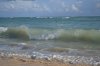
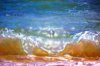
    thanks for all the help i did use plastic wrap but not happy with the result yet ..just saw the other answers will apply that as well and try it , this is the result I got so far better way better then before but not quiet there yet also will paste some waves so if anyone want's to give it a go :-) maybe someone finds a way . how to edit this kind of color to my photos ??-barbers2-388.jpg
  11. #8
    Junior Member
    Join Date
    Nov 2011
    Location
    Honolulu
    Posts
    9
    Thanks
    4
    Thanked 1 Time in 1 Post

    Re: how to edit this kind of color to my photos ??

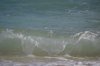
    how to edit this kind of color to my photos ??-barbers2-393.jpghow to edit this kind of color to my photos ??-barbers2-087.jpghow to edit this kind of color to my photos ??-barbers2-009.jpg

  12. #9
    Forum Mod
    Join Date
    Jun 2011
    Location
    Imperial Beach, CA, US
    Posts
    3,573
    Thanks
    97
    Thanked 218 Times in 217 Posts

    Re: how to edit this kind of color to my photos ??

    Quote Originally Posted by Anja Williams View Post
    thanks for all the help i did use plastic wrap but not happy with the result yet ..just saw the other answers will apply that as well and try it , this is the result I got so far better way better then before but not quiet there yet also will paste some waves so if anyone want's to give it a go :-) maybe someone finds a way .]
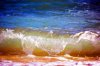
    I can see that you might want to continue to work with an effect or two, but I think you have gotten pretty close to the results you want; maybe even better. If the above example was not blurry to begin with, then a blur was applied. That may be what you feel is missing.

    As for the last two photographs you posted, nothing can really be done with them until you adjust them to be decent pictures. They need changes in exposure, levels, contrast, sharpness, curves . . . a couple or all of the above. Good luck with that. But you'll get much better results if you attend to that first. Open them up in Bridge and go through the steps provided there. It is worthwhile to watch/read some tutorials on using Bridge or otherwise learning how to make/edit photos.

  13. #10
    Guru
    Join Date
    Jan 2011
    Location
    Elizabeth Port NJ
    Posts
    1,503
    Thanks
    15
    Thanked 149 Times in 143 Posts

    Re: how to edit this kind of color to my photos ??

    Hi Anja Williams

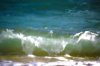
    I had i lil time to play whit your stock image, and this is what i got so far

    how to edit this kind of color to my photos ??-barbers2-009_contrast.jpg

    As you can see, using the tools mentioned above, plus contrast enhancements, the result achieved looks similar to the original image, but you have to remember that in those pictures the highlights and shadows plus color information, are completely different so the filter will process the image in a different way for every single image.

    I'll suggest experimenting whit those tools, until you get something you like.

    Have fun.
    Last edited by $1r_M4x1mu$; 11-03-2011 at 06:40 PM.
    ibclare likes this.
    Cuando soy Bueno, soy muy BUENO
    Pero cuando soy malo, soy mucho MEJOR


Tags for this Thread

Posting Permissions

  • You may not post new threads
  • You may not post replies
  • You may not post attachments
  • You may not edit your posts
Powered by vBulletin® Version 4.1.9
Copyright © 2012 vBulletin Solutions, Inc. All rights reserved.
Content Relevant URLs by vBSEO 3.6.0
Copyright 2011 Photoshop Gurus Forum. All rights reserved.
All times are GMT -5. The time now is 07:05 AM.
vBulletin Skins