-
Automotive Photography
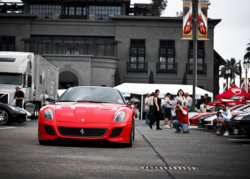
If you look at my home page slide show, it will give you an idea of my shooting style. I'm always looking for more ways to make my photos pop.
http://www.tonygphotography.com/
Here's a list of the few things I do to make an image pop.
RAW window:
crop to tweak the composition
bump up the vibrance
clarity if needed
white balance adjustments
vignetting (only added if it brings out the subject)
CS5:
remove any stickers radar detectors etc... using cloning tool or similar.
remove anything else that detracts the viewer.
(If the image needs a tad bit more sharpening) I copy the layer apply a high pass filter and the layer style to overlay. It usually only takes about a 1 or lower to do the trick.
then save as jpeg.
And that's about it. It's a short and sweet way to process them.
I'm wondering if you guys have any other idea's I can try out. Besides HDR, That's been over done.
Thanks
Last edited by tonygphoto; 11-30-2011 at 10:29 PM.
-
-
Member
Re: Automotive Photography
Hi tony,
totally agree about HDR, been way to overdone in photography recently.
Your website isn't displaying properly for me, there's no CSS displaying, just black text, white background and thumbnails.
If you want to make the car stand out more, try creating a new layer, using a large black brush create a fade to black on that layer, set the layer to overlay and bring down the opacity slightly.
That should make the car stand out a bit from the background
Tim
-
-
Re: Automotive Photography

Originally Posted by
TiMmY
Hi tony,
totally agree about HDR, been way to overdone in photography recently.
Your website isn't displaying properly for me, there's no CSS displaying, just black text, white background and thumbnails.
If you want to make the car stand out more, try creating a new layer, using a large black brush create a fade to black on that layer, set the layer to overlay and bring down the opacity slightly.
That should make the car stand out a bit from the background
Tim
Try this link
Have you updated your flash?
Which web browser are you using?
It works on every computer and web browser I have tried.
-
-
Administrator
Re: Automotive Photography
-
The Following User Says Thank You to Steve For This Useful Post:
-
Member
Re: Automotive Photography
Hi Tony
I like the website, especially the pictures of red Ferrari's! They really seem to stand out. I'm also a fan of the ones where the car has clearly caught the eye of a passer by, that really enhances the car in my opinion - nice touch
-
-
Re: Automotive Photography

Originally Posted by
Steve
Welcome to PSG Tony.
Thank you. 
webwize:
Thanks. I've shot lots of car shows. I find it easier to include the people in the composition rather than waiting for a clear shot of the car. It takes proper timing and logistics to capture the moment. Since I shoot for the events, it's just as important to capture the people as it is the cars. Here recently I've been using a scissor lift to get up high enough. In the past I would carry a 6' ladder around. Anything to make my shots different from the others that are taken the same day.
That's why I here on this forum. I want to learn different techniques to further advance the quality of my photography.
-
-
Re: Automotive Photography

Originally Posted by
webwize
Hi Tony
I like the website, especially the pictures of red Ferrari's! They really seem to stand out. I'm also a fan of the ones where the car has clearly caught the eye of a passer by, that really enhances the car in my opinion - nice touch

I desaturate most of all the other colors to make all the reds pop out of the photo. It takes your eyes around the photo and not just on the car.
Last edited by tonygphoto; 12-01-2011 at 08:03 AM.
-
-
Member
Re: Automotive Photography

Originally Posted by
tonygphoto
Try this link
Have you updated your flash?
Which web browser are you using?
It works on every computer and web browser I have tried.
Yeah, my flash is updated, I was using Raven, thought that might have been the problem however no; It isn't working on Firefox either.
Tim
-
-
Re: Automotive Photography

Originally Posted by
TiMmY
Yeah, my flash is updated, I was using Raven, thought that might have been the problem however no; It isn't working on Firefox either.
Tim
Have you tried Google Chrome or Internet Explorer? I haven't tried Ravan. It works with my FireFox, Safari, Opera etc...
Is anyone else having a problem? I know certain computers are unable due to admin security settings. IE my brother can not see the page from his work computer. He told me he had the same problem.
-
-
Forum Mod
Re: Automotive Photography
-
Tags for this Thread
Posting Permissions
- You may not post new threads
- You may not post replies
- You may not post attachments
- You may not edit your posts
Forum Rules
Powered by
vBulletin® Version 4.1.9
Copyright © 2012 vBulletin Solutions, Inc. All rights reserved.
Content Relevant URLs by
vBSEO 3.6.0
Copyright 2011 Photoshop Gurus Forum. All rights reserved.