
timbucktooth
New Member
- Messages
- 3
- Likes
- 0
hi, i'm using PS cs5, i have a 256mb dedicated graphics card, VRAM is set at 100% of 241mb according to photoshop's settings.
my issue is after i have a 3d model open in PS and i apply a materiel to it, the texture details are not clean and crisp instead they look sort of blotted, except while i am rotating the model, then the texture shifts sort of and looks nice and clean like it should.
i have added two images to help explain.
i use both 32 and 64 bit versions and its the same in both.
can someone please explain how i can fix this?
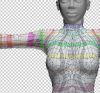
this is how is looks when the model is open as normal and ready to be worked on.
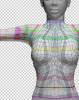
and this is how it looks when i am using the rotate tool to move the model around. i would like if it could always look like this.
any help is appreciated, thank you.
my issue is after i have a 3d model open in PS and i apply a materiel to it, the texture details are not clean and crisp instead they look sort of blotted, except while i am rotating the model, then the texture shifts sort of and looks nice and clean like it should.
i have added two images to help explain.
i use both 32 and 64 bit versions and its the same in both.
can someone please explain how i can fix this?
this is how is looks when the model is open as normal and ready to be worked on.
and this is how it looks when i am using the rotate tool to move the model around. i would like if it could always look like this.
any help is appreciated, thank you.
Last edited:


