
1Likes
-
materiel on 3d object not displaying clean and smooth.
hi, i'm using PS cs5, i have a 256mb dedicated graphics card, VRAM is set at 100% of 241mb according to photoshop's settings.
my issue is after i have a 3d model open in PS and i apply a materiel to it, the texture details are not clean and crisp instead they look sort of blotted, except while i am rotating the model, then the texture shifts sort of and looks nice and clean like it should.
i have added two images to help explain.
i use both 32 and 64 bit versions and its the same in both.
can someone please explain how i can fix this?
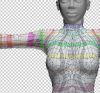
this is how is looks when the model is open as normal and ready to be worked on.
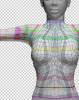
and this is how it looks when i am using the rotate tool to move the model around. i would like if it could always look like this.
any help is appreciated, thank you.
Last edited by timbucktooth; 09-21-2010 at 01:49 AM.
-
-
Member
quite possible its a redraw issue caused by an out of date graphics card driver try up dating them post back results
-
-
Power User
What kind of video card are you using, and in Preferences --> Performance do you have "Enable openGL drawing" checked?
-
-
i have a Nvidia gforce 8400, 256mb dedicated, it has its own control panel where i've fiddled with the settings to no avail. yes i have openGL checked and i just updated the driver as well, nothing has helped. strangely after updating the driver now it doesn't display properly even when rotating.
-
-
Guru
Try turning off openGL drawing, any difference?
-
-
Guru
Looks like a setting to me, i don't think the Driver is the issue here...
-
-
Re: materiel on 3d object not displaying clean and smooth.
i've tried everything. PS settings, the graphic card settings, updated driver, different texture file formats, anything i can think of, nothing makes a difference. i have bodypaint and the texture displays correctly in that program so i can't think its my pc or card.
i'm at my wits end because i really would prefer to use PS as my painting program.
-
-
Junior Member
Re: materiel on 3d object not displaying clean and smooth.
i have the same issue .........
-
-
Junior Member
Re: materiel on 3d object not displaying clean and smooth.
ok., here's one thought ..... Maybe our texture's actual bitmap resolution is not high enough to show smooth upon the zoom level we are working on .... increasing for example the image size to higher resolution makes both views more similar in terms of smoothness .... Went that directiosn as the textures in the static mode look like low resolution bitmap zoomed in. And as photoshop is above all levels i guess always a bitmap based porgram i Increased the image size to higher resolution, decreased the zoom level and rotation view seems almost same as static status view ......
-
-
Junior Member
Re: materiel on 3d object not displaying clean and smooth.
its probably about using the photoshop zoom tool to zoom instead of the 3D camera zoom. The photoshop zoom tool magnifies the viewpoort resulting in the pixelated look.
-
Posting Permissions
- You may not post new threads
- You may not post replies
- You may not post attachments
- You may not edit your posts
Forum Rules
Powered by
vBulletin® Version 4.1.9
Copyright © 2012 vBulletin Solutions, Inc. All rights reserved.
Content Relevant URLs by
vBSEO 3.6.0
Copyright 2011 Photoshop Gurus Forum. All rights reserved.