-
Administrator
Brushes, Patterns, and Textures
Check out FBrushes originally mentioned by member hishandiwork in a post.
-
-
Junior Member
Re: Brushes, Patterns, and Textures
after you download the files how do you put them to PS CS5?
-
-
Administrator
Re: Brushes, Patterns, and Textures
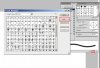
It will vary depending on your OS and what version of PS you're running.
It's C:\Program Files\Adobe\Adobe Photoshop CS5\Presets\Brushes on my WinXP computer.
Putting the ABR file there won't make it automatically available when you open PS, you need to load them.
-
-
Junior Member
Re: Brushes, Patterns, and Textures
Thanks for all your help it worked great!
-
-
Administrator
Re: Brushes, Patterns, and Textures
-
Posting Permissions
- You may not post new threads
- You may not post replies
- You may not post attachments
- You may not edit your posts
Forum Rules
Powered by
vBulletin® Version 4.1.9
Copyright © 2012 vBulletin Solutions, Inc. All rights reserved.
Content Relevant URLs by
vBSEO 3.6.0
Copyright 2011 Photoshop Gurus Forum. All rights reserved.