-
Guru
Photoshop Pen Tool Challenge
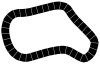
I did this while helping someone design a boardgame. They wanted evenly spaced areas around a track.
I've found one of the best ways to learn new things in Photohop, is to try to duplicate things I see others do.
I thought it might be interesting to present a challenge to try to duplicate. Use can any method you like. But I will tell you that it was done very quickly and easily using only the pentool and stroking. So with that in mind as a hint, have at it.
Mods: please move if you feel there is a better place for this.
-
-
Administrator
Re: Pentool Challenge
Hi Hawkeye, great idea.
I've never got the hang of the pen tool so I never used it much.
That recent post on the pen tool, "Stroke Path" doesn't seem to do as it says any more?, actually got me playing with it so I could try to help out the OP.
I never would have figured out your answer though.
-
-
Guru
Re: Photoshop Pen Tool Challenge
Great idea!
I'll give it a go later when I have time. I'm horrible at the Pen tool and this will be helpful 
I moved this to contests.
-
-
Guru
Re: Photoshop Pen Tool Challenge
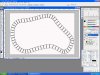
Attachment 718set the points will do more later. could probably use less but pen tool practice is a must for me. still have to smooth out the rough(turns cuts. am I on right track?
-
-
Guru
Re: Photoshop Pen Tool Challenge
iDad--Here's a hint, I did it with just one single path, not two.
This is one of those obviiously simple things after you see it.
-
-
Guru
Re: Photoshop Pen Tool Challenge
One those, DOH!! why didn't i think of that!! Will tinker with it tonight, try and wait to post the solution until tomoz if ya can hawkeye..
-
-
Guru
Re: Photoshop Pen Tool Challenge

Originally Posted by
hawkeye
iDad--Here's a hint, I did it with just one single path, not two.
This is one of those obviiously simple things after you see it.
that is one path you see the lower portion to left
you did the cross beams as one also?.Ahhhhhhhh I know how!
-
-
Guru
Re: Photoshop Pen Tool Challenge
I used the same single path for all the elements.
Sure I'll wait until tomorrow at least for the solution. It will be no later than Thursday as I leave town Friday morning. Maybe before then someone will come up with a different easy way to do it.
-
-
Power User
Re: Photoshop Pen Tool Challenge
This is what I came up with using only the pen tool, one path and other elements. Not sure if this is right. But I traced the inside of the shape with the pen tool, stoked it 75 pixels, then added the other elements to add division to the board. From start to finish, if on the right track to begin with would take three or four minutes maybe to do.
-
-
Guru
Re: Photoshop Pen Tool Challenge
Looks pretty good, but the way I did it you don't have to draw the section lines manually.
Both elements were done using the same path and stroking.
-
Posting Permissions
- You may not post new threads
- You may not post replies
- You may not post attachments
- You may not edit your posts
Forum Rules
Powered by
vBulletin® Version 4.1.9
Copyright © 2012 vBulletin Solutions, Inc. All rights reserved.
Content Relevant URLs by
vBSEO 3.6.0
Copyright 2011 Photoshop Gurus Forum. All rights reserved.