View Poll Results: who wins you decide

Voters
11. You may not vote on this poll
  • Clare

    4 36.36%
  • Paul

    5 45.45%
  • Motochief

    2 18.18%
+ Reply to Thread
Page 1 of 3 123 LastLast
Results 1 to 10 of 24
Like Tree26Likes

Thread: chop shop week 8 competition

  1. #1
    Senior Member
    Join Date
    Mar 2011
    Location
    Belgium
    Posts
    123
    Thanks
    1
    Thanked 21 Times in 20 Posts

    chop shop week 8 competition

    let's have fun in this contest with smart objects

    I give some examples with smart objects and the game is
    to change the smart object in an other image and show the result

    you can change the smart object by dubbleclicking on the miniature , change and save again


    example 1 you can change car , or you can change background (use PSD to do so )

    chop shop week 8 competition-pod-raceees.gif

    pod raceees.psd
    example 2 and 3 are coming

    Steve and Hoogle like this.

  2. #2
    Senior Member
    Join Date
    Mar 2011
    Location
    Belgium
    Posts
    123
    Thanks
    1
    Thanked 21 Times in 20 Posts

    Re: chop shop week 8 competition

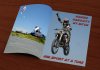
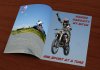
    example 2 change the magazine by using your image instead
    example 3 change the card with reflection by using your image instead

    chop shop week 8 competition-example-2-3.jpg

    magazine.psd

    card.psd

    and you can also make something new of course
    change your image in a smart object , give it a tranformation like a curl or perspective and save as psd

    I hope you like it and have some fun and share the result

  3. #3
    Silly Trucker
    Join Date
    May 2011
    Location
    Trucking the big roads, dust and all.
    Posts
    4,564
    Thanks
    44
    Thanked 228 Times in 223 Posts

    Re: chop shop week 8 competition

    colleague likes this.


  4. #4
    Forum Mod
    Join Date
    Mar 2002
    Location
    Here... ?
    Posts
    5,000
    Thanks
    10
    Thanked 191 Times in 189 Posts

    Re: chop shop week 8 competition

    I like it too but one oversight, Paul.. .. the GT's shadow is there, too....

  5. #5
    Silly Trucker
    Join Date
    May 2011
    Location
    Trucking the big roads, dust and all.
    Posts
    4,564
    Thanks
    44
    Thanked 228 Times in 223 Posts

    Re: chop shop week 8 competition

    Yeah i see it lol.
    This guys holds the world recordAttachment 13594
    Steve, colleague and ibclare like this.


  6. #6
    Administrator
    Join Date
    Jul 2010
    Location
    New Jersey, USA
    Posts
    4,744
    Thanks
    12
    Thanked 160 Times in 150 Posts

    Re: chop shop week 8 competition

    Quote Originally Posted by Paul View Post
    Yeah i see it lol.
    This guys holds the world recordAttachment 13594
    That's great, I love it!!

  7. #7
    Silly Trucker
    Join Date
    May 2011
    Location
    Trucking the big roads, dust and all.
    Posts
    4,564
    Thanks
    44
    Thanked 228 Times in 223 Posts

    Re: chop shop week 8 competition

    In the beginning Attachment 13598


  8. #8
    Forum Mod
    Join Date
    Jun 2011
    Location
    Imperial Beach, CA, US
    Posts
    3,573
    Thanks
    97
    Thanked 218 Times in 217 Posts

    Re: chop shop week 8 competition

    goin' for a ride

    chop shop week 8 competition-goin.gif

    group fly by

    chop shop week 8 competition-flyinby.gif

    Can't hold a candle to that squirrel Paul

    Here is a mystery -- to me -- that I have tried to solve and would like some help doing so. When I use a blending effect such as overlay or soft light -- which is what I originally used for the group's shadow and it worked much better -- once I merge layers, it gets multiplied to even more than the normal mode would be. I've tried making an empty layer below the layer with the blend fx and merging those with the same result. It only turns out OK when I save it as jpeg, etc. without flattening anything. Even when I just select it with other layers and make a smart object, it still treats it as if it were normal (I guess) blend mode. Can someone show me the way?? TY.
    Last edited by ibclare; 02-05-2012 at 04:44 PM.
    colleague and Hoogle like this.

  9. #9
    Senior Member
    Join Date
    Dec 2011
    Location
    Near the Water
    Posts
    166
    Thanks
    1
    Thanked 5 Times in 5 Posts

    Re: chop shop week 8 competition

    This is a kiteboarder friend of mine. I took the picture I used here as well:
    Attached Thumbnails Attached Thumbnails chop shop week 8 competition-pod-races.gif  

    Last edited by MotoChief; 02-05-2012 at 08:28 PM.
    colleague, Hoogle and ibclare like this.

  10. #10
    Senior Member
    Join Date
    Dec 2011
    Location
    Near the Water
    Posts
    166
    Thanks
    1
    Thanked 5 Times in 5 Posts

    Re: chop shop week 8 competition

    Second attempt. tried to change the background this time. I already see what I did wrong though.
    Attached Thumbnails Attached Thumbnails chop shop week 8 competition-pod-races2.gif  


Posting Permissions

  • You may not post new threads
  • You may not post replies
  • You may not post attachments
  • You may not edit your posts
Powered by vBulletin® Version 4.1.9
Copyright © 2012 vBulletin Solutions, Inc. All rights reserved.
Content Relevant URLs by vBSEO 3.6.0
Copyright 2011 Photoshop Gurus Forum. All rights reserved.
All times are GMT -5. The time now is 10:51 AM.
vBulletin Skins