
2Likes
-
Filter for painting style from nazi propaganda posters
Hallo.
Is there a filter to make a photo look like this:
goo gl/PJqfX
I want to test, if I can manipulate this poster (with a german prominent).
Thanks...
-
-
Forum Mod
Re: Filter for painting style from nazi propaganda posters
Can you be more specific on your link please
-
-
Forum Mod
Re: Filter for painting style from nazi propaganda posters
Do you mean cartoon illustrated
-
-
Member
Re: Filter for painting style from nazi propaganda posters

Originally Posted by
Hoogle
Can you be more specific on your link please
This is the correct link: http://goo.gl/PJqfX

Originally Posted by
Anonymos
Is there a filter to make a photo look like this
No, that was done pure by hand.
Last edited by Furio; 01-04-2012 at 07:44 PM.
-
-
Forum Mod
Re: Filter for painting style from nazi propaganda posters
I think he meant this style...
-
-
Silly Trucker
Re: Filter for painting style from nazi propaganda posters
Got to love the bold colours and dramatic sense of power, all based on the Roman Empire you know.
-
-
Forum Mod
Re: Filter for painting style from nazi propaganda posters
You may be able to get similar effects however but you will need some good knowledge on plugins that do sketch effects and then good knowledge on colouring effects in photoshop. If you are referring to the link Furio shared This has taken me 10 miniutes to do and no where near what you are looking for.
-
-
Silly Trucker
Re: Filter for painting style from nazi propaganda posters
Thats because ALL propaganda posters from that time were hand painted NOT photographs.
I would try a slight blur with added grain effect, then drop the saturation a little just to get it right.
-
-
Silly Trucker
Re: Filter for painting style from nazi propaganda posters
Some really good tuts to try out HERE.
-
-
Silly Trucker
Re: Filter for painting style from nazi propaganda posters
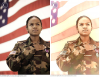
Also made this, original and new.
New one came about by doing a new layer all white pull opacity back to 60% then do another layer with a pattern on it (standard pattern) play with settings, lower opacity again, kind of close i think.
-
Tags for this Thread
Posting Permissions
- You may not post new threads
- You may not post replies
- You may not post attachments
- You may not edit your posts
Forum Rules
Powered by
vBulletin® Version 4.1.9
Copyright © 2012 vBulletin Solutions, Inc. All rights reserved.
Content Relevant URLs by
vBSEO 3.6.0
Copyright 2011 Photoshop Gurus Forum. All rights reserved.