Him_is_Ben
New Member
- Messages
- 3
- Likes
- 0
Hello!
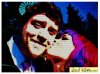
I was meandering about Ikea none too long ago and my girlfriend noticed someimages of comic clippings being used for wall art and commented about how sheliked that idea. This sparked a conversation about how, first off, we couldclip images from comics ourselves, enlarge, print & frame them if we shouldso desire... but, more importantly, take our own images & run them throughphotoshop to create those types of effects and styles. Thus, I set out, satdown & opened up CS4 then started to work over an image that was taken ofus at a friend's wedding.
When I showed her what I had done, there was a problem, she didn't like theway that her hair looked... Suffice to say that my girlfriend does hair for aliving, has done so for many years and has been coloring her hair since she wasa young girl to top it all off. She didn't complain, nor take a real issue withit, in fact, she told me that it was fine & to do whatever I liked, so, Idid just that & I talked to her about what she didn't like & tried todetermine what it was that she was hoping for & what she would likeinstead. Now that's what I'm attempting to give her, though, so far as I amcurrently able, simply cannot deliver on my own in this moment. So I've comehere, seeking aid.
To further explain, what I've done is duplicate the original image a numberof times, then take different filters to the layers while erasing bits &pieces to try to create the type of effect we were looking for. I have two main layersthat I've been working with, one I used the cutout filter on and the other Iused the poster edges filter on... she wasn't fond of what either did to herhair. She likes the rest of the image & thinks it just fine, again, sheisn't complaining, but she isn't as happy as I'd like to make her.
Here is the original image

Here is what I've managed to do to the image as a psd
View attachment comic style wedding p2c.psd
What she told me is that she would like her hair to be more like straightblocks/lines of color, as if someone had gone over it with markers or ink. Sheabsolutely dislikes the way that the cutout filter makes her hair look &doesn’t like the black lines that the poster edges filter gives her hair, saysthat she doesn’t like the way it textures her hair. Ultimately, I suppose thatI’m looking for as much help as I can get. I know that there are a lot of talented people around here and I would sincerely appreciate as many hands on the project as Ican get, thought being, the more options & styles she has to choose from,the more likely she is to find something that she’s fond of & get what shewants out of this project.
So, by all means, if you've seen that someone has already helped out, but, have thoughts on another way you can approach the issue, please, your input & efforts are more than welcome.
Thanks in advance for any & all help with this endeavor
I was meandering about Ikea none too long ago and my girlfriend noticed someimages of comic clippings being used for wall art and commented about how sheliked that idea. This sparked a conversation about how, first off, we couldclip images from comics ourselves, enlarge, print & frame them if we shouldso desire... but, more importantly, take our own images & run them throughphotoshop to create those types of effects and styles. Thus, I set out, satdown & opened up CS4 then started to work over an image that was taken ofus at a friend's wedding.
When I showed her what I had done, there was a problem, she didn't like theway that her hair looked... Suffice to say that my girlfriend does hair for aliving, has done so for many years and has been coloring her hair since she wasa young girl to top it all off. She didn't complain, nor take a real issue withit, in fact, she told me that it was fine & to do whatever I liked, so, Idid just that & I talked to her about what she didn't like & tried todetermine what it was that she was hoping for & what she would likeinstead. Now that's what I'm attempting to give her, though, so far as I amcurrently able, simply cannot deliver on my own in this moment. So I've comehere, seeking aid.
To further explain, what I've done is duplicate the original image a numberof times, then take different filters to the layers while erasing bits &pieces to try to create the type of effect we were looking for. I have two main layersthat I've been working with, one I used the cutout filter on and the other Iused the poster edges filter on... she wasn't fond of what either did to herhair. She likes the rest of the image & thinks it just fine, again, sheisn't complaining, but she isn't as happy as I'd like to make her.
Here is the original image
Here is what I've managed to do to the image as a psd
View attachment comic style wedding p2c.psd
What she told me is that she would like her hair to be more like straightblocks/lines of color, as if someone had gone over it with markers or ink. Sheabsolutely dislikes the way that the cutout filter makes her hair look &doesn’t like the black lines that the poster edges filter gives her hair, saysthat she doesn’t like the way it textures her hair. Ultimately, I suppose thatI’m looking for as much help as I can get. I know that there are a lot of talented people around here and I would sincerely appreciate as many hands on the project as Ican get, thought being, the more options & styles she has to choose from,the more likely she is to find something that she’s fond of & get what shewants out of this project.
So, by all means, if you've seen that someone has already helped out, but, have thoughts on another way you can approach the issue, please, your input & efforts are more than welcome.
Thanks in advance for any & all help with this endeavor