+ Reply to Thread
Page 1 of 4 1234 LastLast
Results 1 to 10 of 38
Like Tree4Likes

Thread: Easier sharing

  1. #1
    Guru
    Join Date
    May 2011
    Location
    Sweden
    Posts
    1,359
    Thanks
    34
    Thanked 55 Times in 54 Posts

    Easier sharing

    I donīt really know anything about how things like this work, and what is feasible, but I think there should be something here that makes uploading and sharing resources easier.

    Couldnīt there be the same kind of quick upload icon thing as the tree window, (sorry I donīt know what anything is called lol) for PSDīs and ABRīs and things? at least some kind of shortcut that makes things easier to link than going to the "advanced" part and doing it from there?

    And also, would it take up too much space or something to have a forum where people could upload high resolution stock images, and backgrounds and things to share? I think that would bring in quite a bit of traffic to the site, as well as being a cool resource in general.

    I have tons of pictures and things I would like to give away, but itīs such a hassle to resize things and so on, and the quality turns out bad as well.

    I suppose that if this were possible it would already have been done, again, I donīt know about the space thing, Iīm just wondering.

  2. #2
    Administrator
    Join Date
    Jul 2010
    Location
    New Jersey, USA
    Posts
    4,744
    Thanks
    12
    Thanked 160 Times in 150 Posts

    Re: Easier sharing

    Hi Vafann.

    I think I know what you mean but we stuck within the restraints of what the program can do.
    As you know the icon and and Manage Attachments is what we're stuck with.

    Right now bushes and other tools can be uploaded to,
    Forum: Photoshop Brushes
    Share & Download Adobe Photoshop Brushes and other drawing & painting tools


    Images can be posted at,
    Forum: Show-Board
    Post your artwork, ask for critique, show off, and help others learn through example.

    Now I know what you mean about being organized and easy to find but vBulletin
    isn't setup like a search-able database for searching and finding specific images.

    It doesn't even do a great job finding specific posts.

    The only think I can think of is for you to start a new post in the appropriate section and post your high resolution images in that thread. When you have addition images you can post them in the same thread.

    If the jpg's are larger than what's allowed, you can put the image in a Zip or Rar folder, then you would need to provide a thumbnail.

    Another option is linking from a photo sharing site that doesn't compress the file.

    I'm happy to work with you to figure out a good way to make this work.
    Steve

  3. #3
    Guru
    Join Date
    May 2011
    Location
    Sweden
    Posts
    1,359
    Thanks
    34
    Thanked 55 Times in 54 Posts

    Re: Easier sharing

    Quote Originally Posted by Steve View Post
    Hi Vafann.

    I think I know what you mean but we stuck within the restraints of what the program can do.
    As you know the icon and and Manage Attachments is what we're stuck with.

    Right now bushes and other tools can be uploaded to,
    Forum: Photoshop Brushes
    Share & Download Adobe Photoshop Brushes and other drawing & painting tools


    Images can be posted at,
    Forum: Show-Board
    Post your artwork, ask for critique, show off, and help others learn through example.

    Now I know what you mean about being organized and easy to find but vBulletin
    isn't setup like a search-able database for searching and finding specific images.

    It doesn't even do a great job finding specific posts.

    The only think I can think of is for you to start a new post in the appropriate section and post your high resolution images in that thread. When you have addition images you can post them in the same thread.

    If the jpg's are larger than what's allowed, you can put the image in a Zip or Rar folder, then you would need to provide a thumbnail.

    Another option is linking from a photo sharing site that doesn't compress the file.

    I'm happy to work with you to figure out a good way to make this work.
    Steve
    Thank you Steve! What is the limit size for Jpegs? Most photos directly out of a camera are like about between 2 and 10 mp or something I think. I know you say that the max limit for Psdīs are like 20 mp, if this is the same for pictures then it shouldnīt be a problem? I keep thinking that this is a storage space problem, I donīt understand the space economy thing here.

  4. #4
    Guru
    Join Date
    May 2011
    Location
    Sweden
    Posts
    1,359
    Thanks
    34
    Thanked 55 Times in 54 Posts

    Re: Easier sharing

    I meant MB lol.

  5. #5
    Administrator
    Join Date
    Jul 2010
    Location
    New Jersey, USA
    Posts
    4,744
    Thanks
    12
    Thanked 160 Times in 150 Posts

    Re: Easier sharing

    You can post what is just under a 10MP image at 3500X3500 and 10MB.
    Those limits were put there by admin so he must feel server space can handle those sizes.

    There are a few obstacles I see for this working well here.
    You can't search effectively for a specific type of image and since this is a talk forum you'll get more talk than images.
    More images mean more comments and you'll get what we already.

    Look closer at Albums and see if that's something that may be useful for you, I will too.
    It would be a showcase though not a search-able database.

  6. #6
    Forum Mod
    Join Date
    Jun 2011
    Location
    Uk
    Posts
    5,620
    Thanks
    85
    Thanked 449 Times in 424 Posts

    Re: Easier sharing

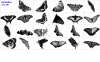
    You can however just use winrar and put all your brush presets pattern presets etc all in 1 archive then you could also use something like ABR viewer to save a png of the brushes which will take a snap shot of your brushes in that set and make it all into 1 image so people know what your sharing comes out like this
    Easier sharing-butterflies.png
    and if I want to share these brushes with you I just add it to a rar file and upload that by using the upload image quick link in quick reply and you get this Butterflies_s2o.rar

  7. #7
    Senior Member
    Join Date
    Sep 2011
    Location
    Manchester, UK
    Posts
    156
    Thanks
    0
    Thanked 10 Times in 10 Posts

    Re: Easier sharing

    CloudApp is an awesome tool for sharing stuff if you're on a Mac

  8. #8
    Forum Mod
    Join Date
    Jun 2011
    Location
    Uk
    Posts
    5,620
    Thanks
    85
    Thanked 449 Times in 424 Posts

    Re: Easier sharing

    In fact why not just have a topic called sharing with threads of brushes 1 for layer styles and 1 for patterns with the rules of the only thing with every post is an ABR viewer or equivalent preview image like my above post a description maybe and a download file that is a zip with the brushes, layer styles or patterns in. People can not comment on it but everyone can say thankyou via the thank you and like link that way each post will be an easy to see image of what your downloading and the actual download. That would keep the thread tidy and people can browse quickly to see if anyone has shared anything they would like.

  9. #9
    Guru
    Join Date
    May 2011
    Location
    Sweden
    Posts
    1,359
    Thanks
    34
    Thanked 55 Times in 54 Posts

    Re: Easier sharing

    Quote Originally Posted by Steve View Post
    You can post what is just under a 10MP image at 3500X3500 and 10MB.
    Those limits were put there by admin so he must feel server space can handle those sizes.

    There are a few obstacles I see for this working well here.
    You can't search effectively for a specific type of image and since this is a talk forum you'll get more talk than images.
    More images mean more comments and you'll get what we already.

    Look closer at Albums and see if that's something that may be useful for you, I will too.
    It would be a showcase though not a search-able database.
    I understand that it would be hard to search for any specific image, but we could maybe just have a thread or forum or something called " PSG Free Stock Photos/ Resources" or something, and then people would have to look around for themselves at what is in it, or have a forum with different threads like "Nature photos", "Animal Photos" "Misc Photos" and so on?

    If someone is looking for a certain kind of image for a project or something, then they can look around and maybe find something usuful?

    Iīm sure most everybody has a bunch of images laying around just taking up space, they could post them here, they wouldnīt have to be their best work or anything, you never know when you might even just need to cut out some little part of something, that might otherwise not be of much use to anyone.

  10. #10
    Guru
    Join Date
    May 2011
    Location
    Sweden
    Posts
    1,359
    Thanks
    34
    Thanked 55 Times in 54 Posts

    Re: Easier sharing

    Quote Originally Posted by Hoogleman View Post
    In fact why not just have a topic called sharing with threads of brushes 1 for layer styles and 1 for patterns with the rules of the only thing with every post is an ABR viewer or equivalent preview image like my above post a description maybe and a download file that is a zip with the brushes, layer styles or patterns in. People can not comment on it but everyone can say thankyou via the thank you and like link that way each post will be an easy to see image of what your downloading and the actual download. That would keep the thread tidy and people can browse quickly to see if anyone has shared anything they would like.
    Yes Hoogle! I think thatīs a good idea too! I think the "thanks" link would suffice, if someone really likes something a lot, and wants to personally comment and thank someone, they can always PM them.


Tags for this Thread

Posting Permissions

  • You may not post new threads
  • You may not post replies
  • You may not post attachments
  • You may not edit your posts
Powered by vBulletin® Version 4.1.9
Copyright © 2012 vBulletin Solutions, Inc. All rights reserved.
Content Relevant URLs by vBSEO 3.6.0
Copyright 2011 Photoshop Gurus Forum. All rights reserved.
All times are GMT -5. The time now is 12:17 PM.
vBulletin Skins