Hi,
New to the site, but it seems like a great wealth of information that is going to keep me reading for a very long time!
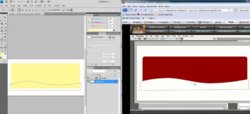
I'm, obviously, new to photoshop, but have myself a few tutorial dvds - one of which is teaching me how to make a banner for my website. A picture in this case is worth a thousand words:

I'm trying to make a curvy line on the bottom of the rectangle shape - as the tutor is doing. However, when I move the anchor it alters the shapes colour (which is not what happens on his)
He then joins the two ends of the line with the normal pen tool below the image - again - it is see through, whereas mine alters the colour:

I've tried to go over it, restarted the program etc. I just don't really understand. All he is doing is creating a new layer for the rectangle, drawing a line with the pen tool. adding two anchor points, then holding ctrl to drag them.
The only thing I can think of is that my ctrl key is broken, and I have to use the onscreen keyboard instead.
Can anyone help please? Its driving me mad!!!!!
Cheers
Nick
New to the site, but it seems like a great wealth of information that is going to keep me reading for a very long time!
I'm, obviously, new to photoshop, but have myself a few tutorial dvds - one of which is teaching me how to make a banner for my website. A picture in this case is worth a thousand words:
I'm trying to make a curvy line on the bottom of the rectangle shape - as the tutor is doing. However, when I move the anchor it alters the shapes colour (which is not what happens on his)
He then joins the two ends of the line with the normal pen tool below the image - again - it is see through, whereas mine alters the colour:
I've tried to go over it, restarted the program etc. I just don't really understand. All he is doing is creating a new layer for the rectangle, drawing a line with the pen tool. adding two anchor points, then holding ctrl to drag them.
The only thing I can think of is that my ctrl key is broken, and I have to use the onscreen keyboard instead.
Can anyone help please? Its driving me mad!!!!!
Cheers
Nick