+ Reply to Thread
Page 1 of 2 12 LastLast
Results 1 to 10 of 12
  1. #1
    Member
    Join Date
    Mar 2010
    Posts
    52
    Thanks
    4
    Thanked 0 Times in 0 Posts

    Selective adjustment to photo

    Hello,

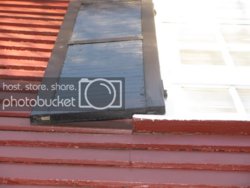
    I have a photo of a window with shutters. The shutters are too dark and the window is a bit over-exposed.

    The shutters are most important for display. How can I lighten the shutters to see the detail without lightening the entire photo? I tried working with the levels, but no luck.

    It would also be good if I could darken the over-exposed window too.

    I have CS2. Thanks in advance - I'm new to this.

  2. #2
    Guru
    Join Date
    Jul 2009
    Location
    right in front of you
    Posts
    5,513
    Thanks
    20
    Thanked 123 Times in 120 Posts
    try using shadows/highlights levels to pull out the detail a bit darker...or lighter

  3. #3
    Member
    Join Date
    Mar 2010
    Posts
    52
    Thanks
    4
    Thanked 0 Times in 0 Posts
    Would I do that for the entire photo or just for the shutters. If so how do I adjust a select area?

  4. #4
    Guru
    Join Date
    Jul 2009
    Location
    right in front of you
    Posts
    5,513
    Thanks
    20
    Thanked 123 Times in 120 Posts
    thats hard to say without seeing the photo but sounds like just the shutters,I would probably use one of the Lasso tools to select them (all depends on image)

  5. #5
    Member
    Join Date
    Mar 2010
    Posts
    52
    Thanks
    4
    Thanked 0 Times in 0 Posts
    thanks, I will find a tutorial on changing shadow/highlight levels.

  6. #6
    Guru
    Join Date
    Mar 2010
    Location
    Mesa, Arizona
    Posts
    980
    Thanks
    0
    Thanked 60 Times in 59 Posts
    There are many ways to do it, it all depends on the image itself. You should post a copy.

  7. #7
    Member
    Join Date
    Mar 2010
    Posts
    52
    Thanks
    4
    Thanked 0 Times in 0 Posts
    Tried to upload a photo but unable to. Nothing happens when uploaded.

  8. #8
    Guru
    Join Date
    Mar 2010
    Location
    Mesa, Arizona
    Posts
    980
    Thanks
    0
    Thanked 60 Times in 59 Posts
    Quote Originally Posted by puppychew View Post
    Tried to upload a photo but unable to. Nothing happens when uploaded.
    Use an online host such as Imageshack. Copy the direct link and place it inside the code like this:
    [img] direct link [/img]

  9. #9
    Member
    Join Date
    Mar 2010
    Posts
    52
    Thanks
    4
    Thanked 0 Times in 0 Posts
    thanks,
    here it is - I need to show the angle and detail of the shutter for mounting. The window is washed out. If I darken the window with levels, the shutter will darken too and detail will be gone.


  10. #10
    Guru
    Join Date
    Mar 2010
    Location
    Mesa, Arizona
    Posts
    980
    Thanks
    0
    Thanked 60 Times in 59 Posts
    Probably the easiest way to select the window would be with Select-Color Range. Click on the white shutter area then use the slider to refine the selection. After you have the selection you can remove any unwanted areas with the lasso set to Subtract from Selection, and add any missed areas with it set to Add to Selection.
    When you have it the way you want, copy and paste it to a new layer. Now use levels (or whatever you want) on the new layer copy.


Posting Permissions

  • You may not post new threads
  • You may not post replies
  • You may not post attachments
  • You may not edit your posts
Powered by vBulletin® Version 4.1.9
Copyright © 2012 vBulletin Solutions, Inc. All rights reserved.
Content Relevant URLs by vBSEO 3.6.0
Copyright 2011 Photoshop Gurus Forum. All rights reserved.
All times are GMT -5. The time now is 09:44 PM.