
+ Reply to Thread
Results 1 to 2 of 2
  1. #1
    Newbie
    Join Date
    Feb 2011
    Posts
    1
    Thanks
    0
    Thanked 0 Times in 0 Posts

    Gaussian blur effect creates strange lines?

    So I wanted to make a background with some shading, I used gaussian blur at 250, and some lines appeared, as if in some low res photo. Sometimes this get really bad.
    I wonder what causes this, is there a way to use a lot of blur without getting these lines?

    Thanks,

    Here's an example:
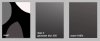
    Gaussian blur effect creates strange lines?-sample.jpg

  2. #2
    Guru
    Join Date
    Apr 2010
    Location
    Sweden
    Posts
    444
    Thanks
    0
    Thanked 15 Times in 13 Posts

    Re: Gaussian blur effect creates strange lines?

    The "effect" you get is known as Banding and Gaussian Blur unfortunately produce these artefacts at high settings. One way to reduce them is to work with 16-bit images and another is to put a small ammount of Noise on the layer(-s) with Gaussian Blur to kind of hide the banding. Sometimes it helps to put the blur on in several steps a bit at the time, but I wouldn't bet my money on it. Try other blurs as well.
    --- dkj ---
    Home: JgraphNet.com - Photoshop Retouching
    Blog: JgraphNet Space


Posting Permissions

  • You may not post new threads
  • You may not post replies
  • You may not post attachments
  • You may not edit your posts
Powered by vBulletin® Version 4.1.9
Copyright © 2012 vBulletin Solutions, Inc. All rights reserved.
Content Relevant URLs by vBSEO 3.6.0
Copyright 2011 Photoshop Gurus Forum. All rights reserved.
All times are GMT -5. The time now is 12:42 PM.
vBulletin Skins