-
Member
crop and reduce size of image
Hi - using photoshop CS5
I need to fit a photo into a webpage spot that is 300 pix wide by 380 tall.
When I crop the photo to 300 x 380, it just cuts off a small part of the picture that I need.
What can i do to make the part of the picture that I need just a bit smaller to fit into the crop box?
Image size is 1600w x 1200 t if that matters.
thanks in advance, ken
-
-
Administrator
Re: crop and reduce size of image
Use Edit|Content Aware Scale in CS5.
-
-
Member
Re: crop and reduce size of image
Sorry but I really don't understand what to do.
-
-
Administrator
Re: crop and reduce size of image
Duplicate the layer if it's a locked Background layer, and turn off the background layer this won't work on a locked layer.
Go to Image|Image Size and change it to 300W X 400H.
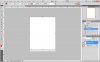
Go to Edit|Content Aware Scale and duplicate what I did in the 1st image below.
The red boxes show the important settings
You should now have a 300X380 image in a 300X400 layer with all of the image and the least amount of distortion.
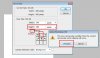
Go to Image|Canvas Size and duplicate what you see in the 2nd image
Save the file new 300X380 file.

-
-
Member
Re: crop and reduce size of image
-
Posting Permissions
- You may not post new threads
- You may not post replies
- You may not post attachments
- You may not edit your posts
Forum Rules
Powered by
vBulletin® Version 4.1.9
Copyright © 2012 vBulletin Solutions, Inc. All rights reserved.
Content Relevant URLs by
vBSEO 3.6.0
Copyright 2011 Photoshop Gurus Forum. All rights reserved.