
I bet this is an easy one?? When I outline an object in a photo and make it a clipping path , then do a copy&paste into another photo , what do I have to do to get the path to be activated in the new photo ?? It appears as a layer but the path won't go active. :banghead:
Photoshop Gurus Forum
Welcome to Photoshop Gurus forum. Register a free account today to become a member! It's completely free. Once signed in, you'll enjoy an ad-free experience and be able to participate on this site by adding your own topics and posts, as well as connect with other members through your own private inbox!
You are using an out of date browser. It may not display this or other websites correctly.
You should upgrade or use an alternative browser.
You should upgrade or use an alternative browser.
Keep path when pasting to another image
- Thread starter SlapShot
- Start date

$1r_M4x1mu$
Guru
- Messages
- 1,487
- Likes
- 294
this works the same as on the layes palette the "Crlt+C, Crtl+V" PC "Cmmnd +C, Cmmnd + V" MAC
Copy and paste basically
On the origin layer go to the paths palette and click on the path and copy then go to the destination file and paste it
Once pasted go to the direct select tool on the left tool box, and then go to your path, while holdin the CRTL "Command" key, click on your path to activate the control points.
Copy and paste basically
On the origin layer go to the paths palette and click on the path and copy then go to the destination file and paste it
Once pasted go to the direct select tool on the left tool box, and then go to your path, while holdin the CRTL "Command" key, click on your path to activate the control points.
$1r_M4x1mu$... Thanks..I did what you described and the path transferred to the destination file no problem....However ONLY the path moved..not the item that the path was on...I went back and copy/pasted the layer separately and the path was no longer connected to the layer... I know ! it makes no sense! How do I move them both so they stay connected ??? Also, i would like to be able to paste a photo here for reference but I don't know how that's done on this site...
$1r_M4x1mu$
Guru
- Messages
- 1,487
- Likes
- 294
Hi SlapShot sorry for the late reply
first you have to copy the layer whit the content and then the path, i don't think is possible to copy the layer and the path a the same time,
Also if the path is disconnected when pasted got to Layer>Vector Mask>current Path, that command will create another vector mask from the copied path, "plus try linking the vector mask to the layer to make it work like one only object"
first you have to copy the layer whit the content and then the path, i don't think is possible to copy the layer and the path a the same time,
Also if the path is disconnected when pasted got to Layer>Vector Mask>current Path, that command will create another vector mask from the copied path, "plus try linking the vector mask to the layer to make it work like one only object"
$1r_M4x1mu$
Guru
- Messages
- 1,487
- Likes
- 294
your welcome 
glad it worked for you
have fun.
glad it worked for you
have fun.

sumonmg
Banned
- Messages
- 11
- Likes
- 1
I fill your problem. But you can easy solve this just follow my indicate. If you follow my indicate you solve not this problem solve another Photoshop clipping path problem.
What Is Clipping Path?
In general, clipping path is an outline created using a pen tool in current image editing software like Adobe Photoshop, Illustrator or InDesign. It is also called a closed vector path, or shape. The main use of a clipping path is to cut out an image from it's background. It can also be used in several different ways like giving something a special shape, editing a particular portion within an image or preparing a layout design. After the clipping path is applied to an image, everything inside the path is included but everything outside the path is committed. This is very useful for the kind of image that has sharp edge.
In the present world, the demand of clipping path is very high within the photo industries like, digital photographer, graphic design and website design houses, advertising agency, catalog company and many more.
Why Use Clipping Path To Remove Background?
There are several different reasons why the clipping path is used to remove background of an image nowadays in the photo industries while still there are some other ways to do the same work.
What Does It Mean By Photoshop Clipping Path?
Nowadays, a path can be drawn in many software, for example, Photoshop, Illustrator, InDesign, Corel Draw and so on. But to remove the background or editing an image, the clipping path is used in the current photo industries which is created using the pen tool in Photoshop. This is the best and most useful way to draw clipping path and remove background of an image.
Who Needs Clipping Path or Clipping Path Service?
In today's world, many individuals and companies need clipping path service. Specially those are involved within digital photographs like photographers, catalog companies, advertising agencies, photographic studios, magazine companies, printing press, web development and graphic design companies.
Clipping Path Tutorial
How To Draw Clipping Path?
1. Open the file you want to use for your clipping path tutorial purpose in Photoshop.
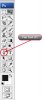
2. From the tool box, select the "Pen Tool" (shortcut key: Ctrl or Cmd + "P"). See the image below.
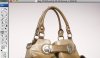
3. Click on the edge of the actual product within the image, release the mouse button. After a certain distance, click again and this time hold and drug your mouse pointer toward the front and curve it as you need for the previous portion. Once you see the outline is exactly within the edge of the product, release the mouse. Continue doing the same thing until you see the point where you started your path. Once you see the starting point, click on it to close the path, you are done of drawing the outside path only.
See the image below
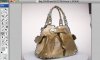
4. Now you need to draw paths for each of the gaps within the product. Start creating a new path point in the same way you did first time and continue drawing until you are closed with the starting point. Continue drawing paths for all gaps. You are done drawing paths for your image to remove background.
See the image below.
Now Ctrl+N new page come and page your image. thanks for understand.
What Is Clipping Path?
In general, clipping path is an outline created using a pen tool in current image editing software like Adobe Photoshop, Illustrator or InDesign. It is also called a closed vector path, or shape. The main use of a clipping path is to cut out an image from it's background. It can also be used in several different ways like giving something a special shape, editing a particular portion within an image or preparing a layout design. After the clipping path is applied to an image, everything inside the path is included but everything outside the path is committed. This is very useful for the kind of image that has sharp edge.
In the present world, the demand of clipping path is very high within the photo industries like, digital photographer, graphic design and website design houses, advertising agency, catalog company and many more.
Why Use Clipping Path To Remove Background?
There are several different reasons why the clipping path is used to remove background of an image nowadays in the photo industries while still there are some other ways to do the same work.
- First concerned is quality. There is no other option that can claim better or same quality which a clipping path drawn by pen tool can offer.
- A clipping path can be applied to almost any kind of file format including JPG, and then place that file directly into layout in e.g. InDesign, this way the file size is reduced.
- After a certain period of work experience using the pen tool, anybody can deal with it very fast while maintaining the top quality.
- A clipping path can be edited at any time simply by using the same pen tool.
- A flatness can also be applied for the kind of image that has soft edge.
- It is the fast and easiest way.
What Does It Mean By Photoshop Clipping Path?
Nowadays, a path can be drawn in many software, for example, Photoshop, Illustrator, InDesign, Corel Draw and so on. But to remove the background or editing an image, the clipping path is used in the current photo industries which is created using the pen tool in Photoshop. This is the best and most useful way to draw clipping path and remove background of an image.
Who Needs Clipping Path or Clipping Path Service?
In today's world, many individuals and companies need clipping path service. Specially those are involved within digital photographs like photographers, catalog companies, advertising agencies, photographic studios, magazine companies, printing press, web development and graphic design companies.
Clipping Path Tutorial
How To Draw Clipping Path?
1. Open the file you want to use for your clipping path tutorial purpose in Photoshop.
2. From the tool box, select the "Pen Tool" (shortcut key: Ctrl or Cmd + "P"). See the image below.
3. Click on the edge of the actual product within the image, release the mouse button. After a certain distance, click again and this time hold and drug your mouse pointer toward the front and curve it as you need for the previous portion. Once you see the outline is exactly within the edge of the product, release the mouse. Continue doing the same thing until you see the point where you started your path. Once you see the starting point, click on it to close the path, you are done of drawing the outside path only.
See the image below
4. Now you need to draw paths for each of the gaps within the product. Start creating a new path point in the same way you did first time and continue drawing until you are closed with the starting point. Continue drawing paths for all gaps. You are done drawing paths for your image to remove background.
See the image below.
Now Ctrl+N new page come and page your image. thanks for understand.
Last edited:

