
+ Reply to Thread
Results 1 to 3 of 3

Thread: Nebula Number 3

  1. #1
    Junior Member
    Join Date
    Apr 2011
    Posts
    17
    Thanks
    0
    Thanked 0 Times in 0 Posts

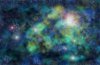
    Nebula Number 3

    Used the dif clouds to render three colours and then blended and delet parts of them and then overlayed it onto a star field I created.

    Done a bit of research on colours so I could get more realistic colours schemes, I also learn about red and blueshift and how this affects the nebula's colours and all objects, but thats a bit complicated.

    ThanksNebula Number 3-untitled-4.jpg
  2. #2
    Forum Mod
    Join Date
    Mar 2002
    Location
    Here... ?
    Posts
    5,001
    Thanks
    10
    Thanked 191 Times in 189 Posts

    Re: Nebula Number 3

    Looks very good. Improving compared to first ones.

    Keep it up.

    It's been years since I did my last space scene. I think I'll join you in creating a few.

  3. #3
    Junior Member
    Join Date
    Apr 2011
    Posts
    17
    Thanks
    0
    Thanked 0 Times in 0 Posts

    Re: Nebula Number 3

    Best thing I found was to try and get a realistic colour scheme for the nebula, good to get one from an iconic image as it makes the image more recognisable as a nebula


Tags for this Thread

Posting Permissions

  • You may not post new threads
  • You may not post replies
  • You may not post attachments
  • You may not edit your posts
Powered by vBulletin® Version 4.1.9
Copyright © 2012 vBulletin Solutions, Inc. All rights reserved.
Content Relevant URLs by vBSEO 3.6.0
Copyright 2011 Photoshop Gurus Forum. All rights reserved.
All times are GMT -5. The time now is 12:57 PM.
vBulletin Skins