-
Forum Mod
Re: How to make a flyer?
I Know how to do it lol
step 1 create your background
step 2 apply a text layer in a nice bold font
step 3 add a top layer of the image you want to appear through text
step 4 with the top layer selected the image you want through your text go to
layer>create clipping mask

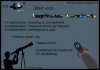
and if you have it like this on a noisey background you want to apply a stroke and an outer glow to the text layer under blending options
-
-
Power User
-
-
Guru
Re: How to make a flyer?
I find it very difficult to read colored letters just an fyi on that
-
-
Guru
Re: How to make a flyer?
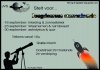
I'd go with no 3. The clipping path text is easier to read.
... and even I understand "Gratis inkom"...
-
-
Power User
Re: How to make a flyer?
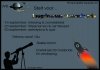
ok so no collored letters, what do you guys thinks about the rocket?
PS: everything you see on the flyer is by quasar, nothing is taken without buying copyright as there is no need to 
EDIT:
Last edited by Burned Ice; 06-30-2011 at 01:10 PM.
Nobody reads this, YOU ARE NOBODY!! :D
-
-
Forum Mod
Re: How to make a flyer?
definately getting better you will need to get that printed professionally as your colour scheme will just bleed into each other if you do it at home if you get my point. also are your dimensions to a template set by printing company
-
-
Power User
Re: How to make a flyer?
hahaha dude, if i make flyers i'm not gonna do this on normal paper, who would be 'that' stupid
a guy from quasar is actually the son of a printing company director so that problem is solved, the size (i guess that's what you ment with dimensions) is taken from a previous flyer
Nobody reads this, YOU ARE NOBODY!! :D
-
-
Forum Mod
Re: How to make a flyer?
actually you could do that on normal paper easily just make the background transparant and use coloured paper
-
-
Junior Member
Re: How to make a flyer?
I would use illustrator it's easier for creating things like brochures and flyers.
-
Tags for this Thread
Posting Permissions
- You may not post new threads
- You may not post replies
- You may not post attachments
- You may not edit your posts
Forum Rules
Powered by
vBulletin® Version 4.1.9
Copyright © 2012 vBulletin Solutions, Inc. All rights reserved.
Content Relevant URLs by
vBSEO 3.6.0
Copyright 2011 Photoshop Gurus Forum. All rights reserved.