-
Junior Member
Re: Rays of Color - like a flashlight
Thanks. I was able to download and load the brush into CS4. I am not sure how to make sure I was using it after I load it. Is the act of loading it from the "Load Brushes..." the same as loading it for use? Do I have to load it each time I want to use it, or is it saved somewhere after I initially load it?
Also, random question, do you use a tablet? you have some nice straight brushstrokes that I'm never really able to produce.
Oh, and thanks for the website with more interesting brushes on it.

Originally Posted by
Hoogleman
here is the psd you will see what I have done and you can add to it the beams are just bright layers but using a light beam brush found here
Light Beams Photoshop & GIMP Brushes | Obsidian Dawn
psd is here
Attachment 5253
once you have downloaded the prushes they will be in a zip file unzip them to somewhere you can easily get to
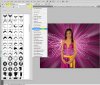
then in photoshop click the arrows highlighted in yellow in pic and select load brushes and navigate to where you extracted them to
hope this helps
Last edited by Glitch; 07-03-2011 at 11:37 PM.
Reason: addendum
-
-
Forum Mod
Re: Rays of Color - like a flashlight
currently no I dont have a tablet the brush itself is only 1 click with each colour the brush automatically does the lines etc (FYI) if you hold down shift key and paint it will only stay in a dead straight line but you can only go up,down or left,right once you have loaded the brushes into photoshop you wshould see them come up when selecting your style of brush. they will also stay there until you reset your brushes
-
-
Junior Member
Re: Rays of Color - like a flashlight
Ah, then I am doing something wrong. I was able to "load brush" but I was suspecting I was just using my old brush. How do I use the brush once it's loaded.
... and thanks for putting up with all my newbie questions. I'm used to the nice simple toolkit on the left side.
-
-
Forum Mod
Re: Rays of Color - like a flashlight
if you look at my last screen shot they are the brushes loaded on the left just scroll down and select the shape your after. they are visible when you click the small arrow highlighted in yellow at the top
-
-
Forum Mod
Re: Rays of Color - like a flashlight
ps you have to select the brush tool first
-
-
Junior Member
Re: Rays of Color - like a flashlight
Ah ha! This was just me being an idiot. ... I needed to scroll down in that window. All I could see were the regular round brush shapes. 
So do I have to load custom brushes every time I want to use them ,or are they 'plugged into' photoshop?

Originally Posted by
Hoogleman
if you look at my last screen shot they are the brushes loaded on the left just scroll down and select the shape your after. they are visible when you click the small arrow highlighted in yellow at the top
-
-
Forum Mod
Re: Rays of Color - like a flashlight
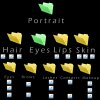
damn accidentally deleted a long message in response so here is a summary. Everyone discovers the free brush presets you can find online (google free photoshop brushes) there are millions varying from portrait touch up including eyes, pupils, eye lashes, eye brows, contact lenses and eye shadow for example then I will have another folder for lips and another 1 for hair even noses I would load all these brushes up at 1 time in photoshop and save this as a preset group and name it portrait so in theory I will only need to select 1 brush file but it will load up all my brushes I would use for portrait touch up I also have custom groups for space with planets stars nebulas galaxies etc etc but save all the brushes as 1 group preset. if you keep all the brushes loaded everytime you will find that you will be scrolling through 1000's of brushes to find 1 that you want so create groups once you have done your portrait touch up for example just reset back to default brushes and load up space brushes etc yes when you load more brushes into photoshop they will stay there until you reset the brush tool or load another custom brush set I suggest you google tutorials on it then there is always making your own brush I have provided a tutorial I made but this can be done with any black and white high contrast image
here is an example of my brush folders
-
-
Junior Member
Re: Rays of Color - like a flashlight
I had a nice long post to you yesterday get deleted too. I'm in the habit of doing a CRTL-A CRTL-C in long posts periodically, but not yesterday apparently!
The tip looks good, and the video was useful as well. Would you believe in all my years of Photoshop, I've never used anything but the default round brush? I didn't even really know other types existed! So now I need to school myself on how to save the brushes (I agree with your save/soft scheme). Also, what screen cap software do you use? I'm doing some bug testing or google (unpaid of course) and need to give them videos of reproducible bugs because they can't seem to reproduce them from my step by step instructions. 

Originally Posted by
Hoogleman
damn accidentally deleted a long message in response so here is a summary. Everyone discovers the free brush presets you can find online (google free photoshop brushes) there are millions varying from portrait touch up including eyes, pupils, eye lashes, eye brows, contact lenses and eye shadow for example then I will have another folder for lips and another 1 for hair even noses I would load all these brushes up at 1 time in photoshop and save this as a preset group and name it portrait so in theory I will only need to select 1 brush file but it will load up all my brushes I would use for portrait touch up I also have custom groups for space with planets stars nebulas galaxies etc etc but save all the brushes as 1 group preset. if you keep all the brushes loaded everytime you will find that you will be scrolling through 1000's of brushes to find 1 that you want so create groups once you have done your portrait touch up for example just reset back to default brushes and load up space brushes etc yes when you load more brushes into photoshop they will stay there until you reset the brush tool or load another custom brush set I suggest you google tutorials on it then there is always making your own brush I have provided a tutorial I made but this can be done with any black and white high contrast image
here is an example of my brush folders
Attachment 5270
-
-
Forum Mod
Re: Rays of Color - like a flashlight
I actually use camtasia studio it is brilliant as it lets you record your key strokes and has a full editing suite built in but is a bit pricey if you want to try some free 1s first here is a top 10 link for free 1s but if you want an easy to use simple solution then camtsia is the best to go make sure you set recording to 25 or 30 frames per second though as many screen cap is set to 15 fps
10 Free Screen Recording Softwares For Creating Attractive Screencasts
by the way I have never met anyone that uses photoshop more than 10% of what it is actually capable off
-
Tags for this Thread
Posting Permissions
- You may not post new threads
- You may not post replies
- You may not post attachments
- You may not edit your posts
Forum Rules
Powered by
vBulletin® Version 4.1.9
Copyright © 2012 vBulletin Solutions, Inc. All rights reserved.
Content Relevant URLs by
vBSEO 3.6.0
Copyright 2011 Photoshop Gurus Forum. All rights reserved.