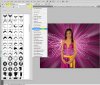
I am working on my business card again and I'd like to start adding color. I have something rather specific in mind. First, here's a sample that is a little close to what I have in mind (without the bubbles): Color Rays
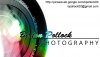
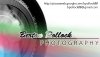
Here is my rough draft card (ignore black on black and gradient in the name issues): Business Card
What I have in mind is for rays of color to come out of the camera lens at a sort of 3D angle so they 'appear' as if they are coming off the card. They will go behind the text to eliminate readability and black on black issues. I want the rays to be more diffuse, think what a flashlight beam would look like. Then add 8 more flashlights with different colors and put them all behind the lens.
In short, my question is: How do I go about airbrushing beams of color that are diffuse and end eventually? Different sizes and shapes of beams too. I need the practice so I can put it to practical use making the card.
I use CS4. I'm ok with it, but not very familiar, so treat me as a newbie please.
Thanks in advance.
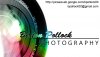
Here is my rough draft card (ignore black on black and gradient in the name issues): Business Card
What I have in mind is for rays of color to come out of the camera lens at a sort of 3D angle so they 'appear' as if they are coming off the card. They will go behind the text to eliminate readability and black on black issues. I want the rays to be more diffuse, think what a flashlight beam would look like. Then add 8 more flashlights with different colors and put them all behind the lens.
In short, my question is: How do I go about airbrushing beams of color that are diffuse and end eventually? Different sizes and shapes of beams too. I need the practice so I can put it to practical use making the card.
I use CS4. I'm ok with it, but not very familiar, so treat me as a newbie please.
Thanks in advance.
Last edited:


 .
.