-
Member
How do you extract channels from a black and white photo?
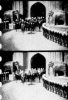
Here is what I mean...

One image has a red record, one image has a green record.
How can I extract the channels of a B&W image (meaning it was never in colour).
-
-
Forum Mod
Re: How do you extract channels from a black and white photo?
I'd like to help but not sure what you mean by extract. B&W photos have red, green,and blue channels just as color photos do.
-
-
Member
Re: How do you extract channels from a black and white photo?

Originally Posted by
ibclare
I'd like to help but not sure what you mean by extract. B&W photos have red, green,and blue channels just as color photos do.
Well, then how do you extract the channels?
-
-
Member
Re: How do you extract channels from a black and white photo?
I mean, how do you set the black and white record to a red or green channel, and make it a black and white picture with a red or green record?
-
-
Guru
Re: How do you extract channels from a black and white photo?
My head hurts 
You have old BW photo which simulate color image? Meaning each frame is for diferent color (R,G,B).
Anyway, if you have in PS BW image and have converted it to RGB (otherwise there isn't any red or blue channel in BW image) but you want take only one color channel to be separate image.
1. Open Channel panel.
2. Click on color you want to extract.
3. Select All (CTRL+A).
4. Copy selection (CTRL+C).
5. Create new document (CTRL+N).
It have to be greyscale by default and copied document size, if it isn't so then you have done something wrong (and selection haven't copied) and you have to repeat and check previous steps.
6. Paste copied information (CTRL+V).
7. Flatten image.
Now you have one channel information in separate document.
Rather than love, than money, than fame, give me truth. © Henry David Thoreau
-
-
Forum Mod
Re: How do you extract channels from a black and white photo?

Originally Posted by
SeniorS
My head hurts
You have old BW photo which simulate color image? Meaning each frame is for diferent color (R,G,B).
Yes, I don't think about that as I always make mine RGB. Yes, if that's what you want, Senior has given you the exact steps.
-
Tags for this Thread
Posting Permissions
- You may not post new threads
- You may not post replies
- You may not post attachments
- You may not edit your posts
Forum Rules
Powered by
vBulletin® Version 4.1.9
Copyright © 2012 vBulletin Solutions, Inc. All rights reserved.
Content Relevant URLs by
vBSEO 3.6.0
Copyright 2011 Photoshop Gurus Forum. All rights reserved.