
FreudChicken
Member
- Messages
- 8
- Likes
- 0
I am trying to make a .gif out of layers of 1-by-1 screencaps of a television show.
Horribly lengthy process, but I have tried so much and can't find another way.
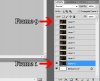
Now, the problem I have is that I cannot find another way to make it show layer 1 on frame 1, layer 2 on frame 2 (etc) without having to manually show every layer on every frame.
This is not an option for 100+ layers (the example picture is not my original project).
I've tried tweening it, but that doesn't do what I want it to do.
Is there a way I can make the animation tab automatically associate layer 1 with frame 1, layer 2 with frame 2 (etc) ?
Horribly lengthy process, but I have tried so much and can't find another way.
Now, the problem I have is that I cannot find another way to make it show layer 1 on frame 1, layer 2 on frame 2 (etc) without having to manually show every layer on every frame.
This is not an option for 100+ layers (the example picture is not my original project).
I've tried tweening it, but that doesn't do what I want it to do.
Is there a way I can make the animation tab automatically associate layer 1 with frame 1, layer 2 with frame 2 (etc) ?


