
-
Junior Member
Multiple layers to gif
I am trying to make a .gif out of layers of 1-by-1 screencaps of a television show.
Horribly lengthy process, but I have tried so much and can't find another way.
Now, the problem I have is that I cannot find another way to make it show layer 1 on frame 1, layer 2 on frame 2 (etc) without having to manually show every layer on every frame.
This is not an option for 100+ layers (the example picture is not my original project).
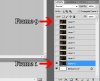
I've tried tweening it, but that doesn't do what I want it to do.
Is there a way I can make the animation tab automatically associate layer 1 with frame 1, layer 2 with frame 2 (etc) ?
-
-
Silly Trucker
Re: Multiple layers to gif
-
-
Junior Member
Re: Multiple layers to gif
That is the exact thing that I'm trying to avoid, changing the visibility of the layers for every frame.
I'd have to do it 323 times.
I did learn some good stuff from that link though. So it was not all helpless!
Thanks!
-
-
Silly Trucker
Re: Multiple layers to gif
Does this meet your request?
-
-
Junior Member
Re: Multiple layers to gif
Sadly, no.
'Import -> Video Frames to Layers' is not an option for me.
I have all the layers ready, there's a lot of them.
But the layers are not automatically associated with the frames, like how it would be if you imported video frames to layers.
-
-
Silly Trucker
Re: Multiple layers to gif
Which shop are you using mate?
-
-
Junior Member
Re: Multiple layers to gif
CS 5 extended version.
There is something wrong with my computer, so video frames to layers doesn't work for me.
-
-
Silly Trucker
Re: Multiple layers to gif
Are you using a downloaded version of the shop?
-
-
Silly Trucker
Re: Multiple layers to gif
-
-
Junior Member
Re: Multiple layers to gif
Yup. But does it matter?
I've tried it countless times, video frames to layers doesn't work no matter how many versions I install/how many times I reinstall them.
It's nice you're trying to help, but I've given up on it ever working and am focusing on the next best thing.
(which is what I described in my original post)
-
Tags for this Thread
Posting Permissions
- You may not post new threads
- You may not post replies
- You may not post attachments
- You may not edit your posts
Forum Rules
Powered by
vBulletin® Version 4.1.9
Copyright © 2012 vBulletin Solutions, Inc. All rights reserved.
Content Relevant URLs by
vBSEO 3.6.0
Copyright 2011 Photoshop Gurus Forum. All rights reserved.